
Number Range and Exceptions
Range option in the Number response type is used to add a number range of a particular action or item. If the response is outside a specified range, this feature triggers a popup message to alert the operator or technician of a potential issue.
To add range value and add exceptions:
- Enter a task or question as Does the valve actuator function within the specified range?.
- Select the Number value from the Responses drop-down.
- Select the Required check box if the value is required.
- Select the relevant Unit like Celsius (oC) for the temperature. For more information, see Number with the Unit of Measurement.
- Click the Range link and add range values for the selected Unit.
-
In the Range window,
- Select Lower Limit and Upper Limit values.
- Click Add Lower Limit and Add Upper Limit to add multiple lower and upper limit values.
- Select the exception from the Actions list like
Warning, Alert,
Note and so on. Note:Click Add New in the list to add a new exception and select the color.
- Enter relevant message for the selected exception. This message displays along with color code when the round is executed.
Figure 1. Number Range 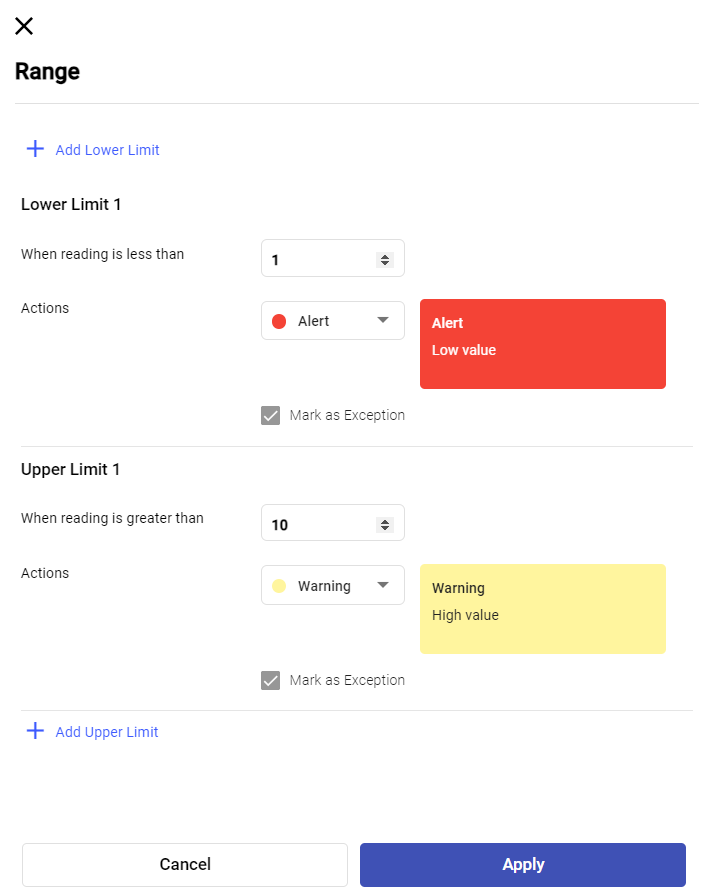
- Click Apply.