
Operations Control Center Dashboard
The Operations Control Center (OCC) gives supervisors a real-time view of all operational activities across rounds, issues, and follow-up actions. It displays information in clear status boards so supervisors can easily monitor progress, identify delays, and manage workload effectively.
Built-in filters help you refine data by Plant, Sort By options (such as Due Date), and time ranges, including Today, Yesterday, 7 Days, 30 Days, 3 Months, 6 Months, or a Custom period.
Users can also create new records using the Create Ad Hoc Round, Create Issue, or Create Action options.
Access the Operations Control Center
To access the OCC module:
- Click the Hamburger menu on the top left of the screen.
- Click the Operations Control Center module.
- Choose between Rounds, Issues, or Actions to review operational performance.
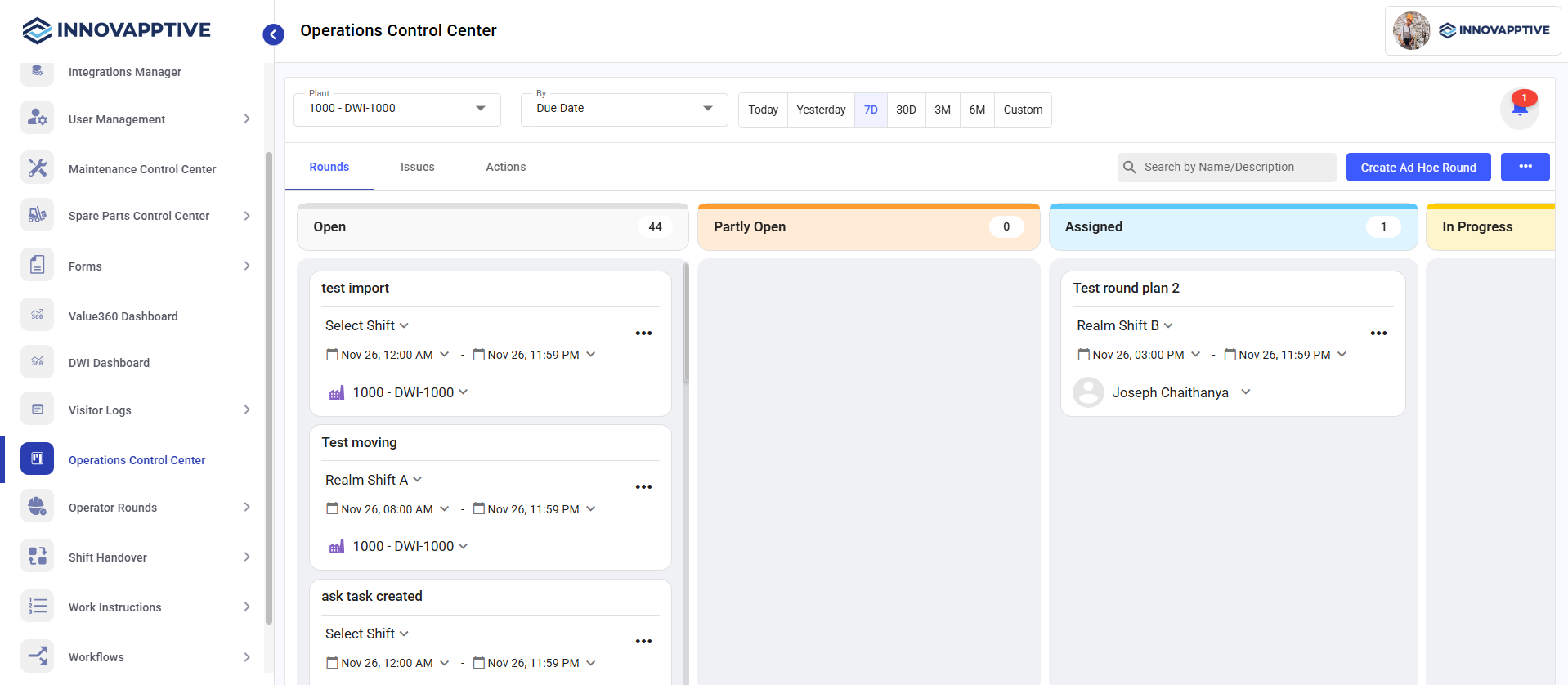
The module is organized into three main tabs for navigation: Rounds, Issues, and Actions.
Rounds Tab
The Rounds tab displays all planned and ad hoc rounds in a status-wise board. This helps supervisors track round progress and quickly identify overdue or skipped tasks.
- Open – Rounds that are assigned but not yet started.
- Partly Open – Rounds that have some checkpoints completed.
- Assigned – Rounds assigned to specific operators.
- In Progress – Rounds currently being executed.
- Submitted – Rounds completed and submitted.
- Pending Approval – Rounds awaiting supervisor review.
- Closed – Fully approved and closed rounds.
- Overdue – Rounds not submitted by the due time.
- Skipped – Rounds intentionally skipped or not executed.
Each card shows:
- Round Name
- Shift
- Scheduled time
- Assigned Operator
- Progress (%)
- Related functional location or unit
Users can click any card to view full round details or update action items.
Issues Tab
The Issues tab helps users view issues categorized by their progress & manage them effectively.
The issues are displayed categorized by their status and it helps supervisors quickly analyze critical issues and prioritize work:
- Open – Newly created issues that require action.
- In Progress – Issues currently being investigated or resolved.
- Resolved – Issues that have been fixed and await closure.
Each issue card displays:
- Issue name
- Priority (Emergency, High, Medium, Low)
- Issue type (Hazard, Incident, Maintenance, etc.)
- Functional location / equipment
- Created and due timestamps
- Assigned user
- Action button to assign or reassign the issue
This tab helps supervisors quickly analyze critical issues and prioritize work.
Actions Tab
The Actions tab displays all corrective or follow-up actions categorized by their status and help supervisors manage them effectively.
Actions are displayed under the following columns:
- Open – Actions that are created but not yet started.
- In Progress – Actions that are actively being worked on.
- Resolved – Actions completed by the responsible user.
- Action name
- Priority level
- Functional location
- Created timestamp
- Assigned user
- Option to assign or update the action.