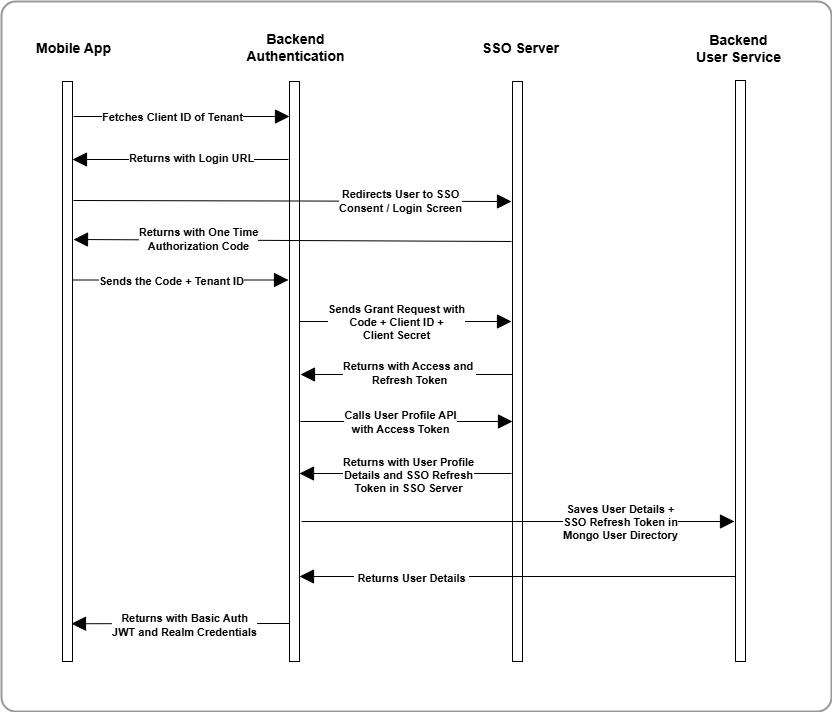
Innovapptive’s mobile apps authenticate users using federated SSO, integrating with
tenant-managed identity providers like Azure AD, Google, or Okta.
The following flow explains the complete authentication sequence—from mobile app
launch to user provisioning—highlighting how the app, backend services, SSO server,
and user management databases interact at each step.
The mobile app fetches the SSO method and Client ID for the tenant from the
Innovapptive DB.
Based on the SSO type, the app displays a single sign-in button, such as Sign
in with Google or Sign in with Okta.
When the user taps the button, an in-app browser opens and redirects them to
the SSO login or consent screen.
Upon successful authentication, the SSO server redirects the user to
Innovapptive’s landing URL with a one-time authorization code.
The app sends this code—along with the tenant ID—to the Auth Backend.
The backend sends a grant request to the SSO server using:
Authorization code
Client ID
Client Secret
The SSO server responds with an access token and a refresh token.
Using the access token, the Auth Backend fetches the user’s profile details
from the SSO server.
The backend then:
Stores the user details and SSO refresh token in the Users Table
Creates a Mongo Realm user with a unique password
The backend returns the following credentials to the mobile app:
Realm username and password
Basic Auth JWT token (used for secure API and DB sync)
Figure 1. Federated SSO Login Flow – From Mobile App to SSO and Backend
Sync