
Install and Verify iCWP Integration Suite Add-Ons
Install the iCWP Integration Suite add-ons using SAP’s standard procedure and verify deployment in ECC and Gateway and then validate them using the steps shown below.
Follow the steps below to install the iCWP Integration Suite add-ons in your SAP environment:
-
Obtain the latest add-ons and support packages from your Innovapptive
representative.
These will typically be provided in a compressed format (e.g., .zip, .rar) via email or FTP.
-
Use the SAP standard procedure to install the add-ons.
Reference: SAP Add-On Installation Guide.
-
Depending on your system landscape, refer to the appropriate table for the
required components:
Table 1. ECC Add-On and Support Packages (Hub System) Type Add-On Description Dependency Add-On EWX0021310268_0000000.PAT iCWP integration suite 2506 ECC Add-on None SP01 EWX0021310268_0000001.PAT iCWP integration suite 2506 ECC HF01 SP EWX0021310268_0000000.PAT SP02 EWX0021310268_0000002.PAT iCWP integration suite 2506 ECC HF02 SP EWX0021310268_0000001.PAT SP03 EWX0021310268_0000003.PAT iCWP integration suite 2506 ECC HF03 SP EWX0021310268_0000002.PAT SP04 EWX0021310268_0000004.PAT iCWP integration suite 2506 ECC HF04 SP EWX0021310268_0000003.PAT SP05 EWX0021310268_0000005.PAT iCWP integration suite 2509.01 ECC SP EWX0021310268_0000004.PAT SP06 EWX0021310268_0000006.PAT iCWP integration suite 2509.02 ECC SP EWX0021310268_0000005.PAT SP07 EWX0021310268_0000007.PAT iCWP integration suite 2509.02.1 ECC SP EWX0021310268_0000006.PAT SP08 EWX0021310268_0000008.PAT iCWP integration suite 2509.03 ECC SP EWX0021310268_0000007.PAT SP09 EWX0021310268_0000009.PAT iCWP integration suite 2510.01 ECC SP EWX0021310268_0000008.PAT SP10 EWX0021310268_0000010.PAT iCWP integration suite 2510.02 ECC SP EWX0021310268_0000009.PAT Table 2. Gateway Add-On and Support Packages (Hub System) Type Add-On Description Dependency Add-On NZY0090055495_0000056.PAT iCWP integration suite 2506 GW Addon None SP01 NZY0090055495_0000057.PAT iCWP integration suite 2506 HF01 GW Addon NZY0090055495_0000056.PAT SP02 NZY0090055495_0000058.PAT iCWP integration suite 2506 HF02 GW Addon NZY0090055495_0000057.PAT SP03 NZY0090055495_0000059.PAT iCWP integration suite 2506 HF03 GW Addon NZY0090055495_0000058.PAT SP04 NZY0090055495_0000060.PAT iCWP integration suite 2508.4 GW Addon NZY0090055495_0000059.PAT SP05 NZY0090055495_0000061.PAT iCWP integration suite 2509.01 GW Addon NZY0090055495_0000060.PAT SP06 NZY0090055495_0000062.PAT iCWP integration suite 2509.02 GW Addon NZY0090055495_0000061.PAT SP07 NZY0090055495_0000063.PAT iCWP integration suite 2509.02.1 GW Addon NZY0090055495_0000062.PAT SP08 NZY0090055495_0000064.PAT iCWP integration suite 2509.03 GW Addon NZY0090055495_0000063.PAT SP09 NZY0090055495_0000065.PAT iCWP integration suite 2510.01 GW Addon NZY0090055495_0000064.PAT SP10 NZY0090055495_0000066.PAT iCWP integration suite 2510.02 GW Addon NZY0090055495_0000065.PAT Table 3. ECC Embedded Add-On and Support Packages Type Add-On Description Dependency Add-On MWX0021310268_0000000.PAT iCWP integration suite 2506 EMB Addon None SP01 MWX0021310268_0000001.PAT iCWP integration suite 2506 HF01 EMB Addon MWX0021310268_0000000.PAT SP02 MWX0021310268_0000002.PAT iCWP integration suite 2506 HF02 EMB Addon MWX0021310268_0000001.PAT SP03 MWX0021310268_0000003.PAT iCWP integration suite 2506 HF03 EMB Addon MWX0021310268_0000002.PAT SP04 MWX0021310268_0000004.PAT iCWP integration suite 2508.4 EMB Addon MWX0021310268_0000003.PAT SP06 EW80021310268_0000001.PAT iCWP integration suite 2508.4 EHP8 Objects MWX0021310268_0000004.PAT SP07 MWX0021310268_0000005.PAT iCWP integration suite 2509.01 EMB Addon MWX0021310268_0000004.PAT
EW80021310268_0000001.PAT (EHP08)
SP08 EW80021310268_0000002.PAT iCWP integration suite 2509.01 EHP8 Objects MWX0021310268_0000005.PAT SP09 MWX0021310268_0000010.PAT iCWP integration suite 2509.02 EMB Addon MWX0021310268_0000005.PAT
EW80021310268_0000002.PAT (EHP08)
SP10 EW80021310268_0000003.PAT iCWP integration suite 2509.02 EHP8 Objects MWX0021310268_0000010.PAT SP11 MWX0021310268_0000007.PAT iCWP integration suite 2509.02.1 EMB Addon MWX0021310268_0000010.PAT
EW80021310268_0000003.PAT (EHP08)
SP12 MWX0021310268_0000008.PAT iCWP integration suite 2509.03 EMB Addon MWX0021310268_0000007.PAT SP13 EW80021310268_0000005.PAT iCWP integration suite 2509.03 EHP8 Objects MWX0021310268_0000008.PAT SP14 MWX0021310268_0000011.PAT iCWP integration suite 2510.01 EMB Addon MWX0021310268_0000008.PAT
EW80021310268_0000005.PAT (EHP08)
SP15 EW80021310268_0000006.PAT iCWP integration suite 2510.01 EHP8 Objects MWX0021310268_0000011.PAT SP16 MWX0021310268_0000013.PAT iCWP integration suite 2510.02 EMB Addon MWX0021310268_0000011.PAT
EW80021310268_0000006.PAT (EHP08)
Note:The items highlighted in bold apply only to users who are using the EHP08 system.Table 4. S/4HANA Add-On and Support Packages Type Add-On Description Dependency Add-On C230021310268_0000019.PAT iCWP integration suite 2506 HANA Addon None SP01 C230021310268_0000022.PAT ICWP integration suite - 2506 HF01 C230021310268_0000019.PAT SP02 C230021310268_0000027.PAT ICWP integration suite - 2510.01 SP02 C230021310268_0000022.PAT SP03 C230021310268_0000031.PAT ICWP integration suite - 2511.01 C230021310268_0000027.PAT Note:These tables should be populated with component names and dependencies as shared by Innovapptive.
Verify Installed Add-Ons For SAP ECC Systems
- Log in to the SAP ECC system.
- Execute transaction code SE37.
-
In the Function Module field, enter /INVICL/*.
Figure 1. Verify ECC System Addons 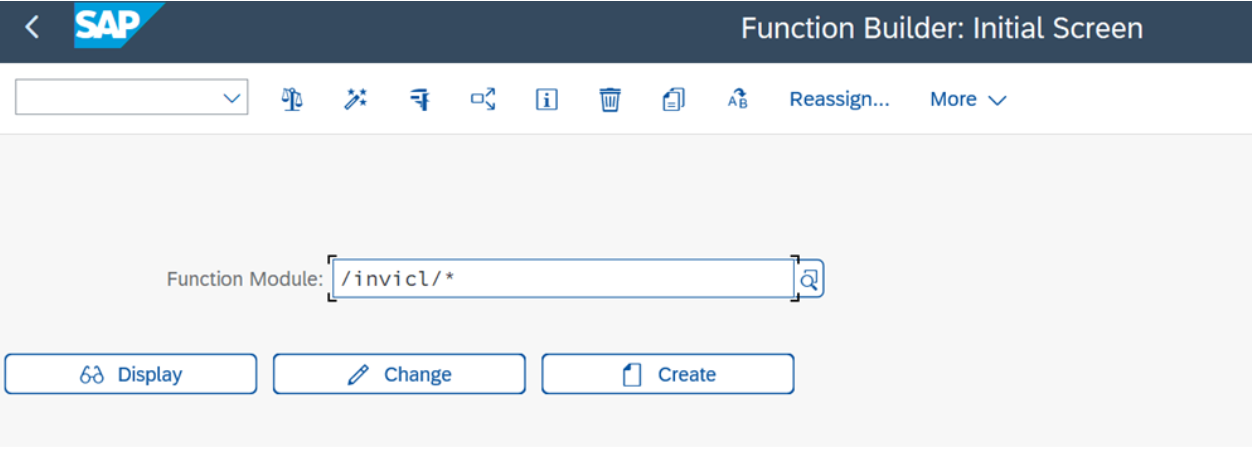
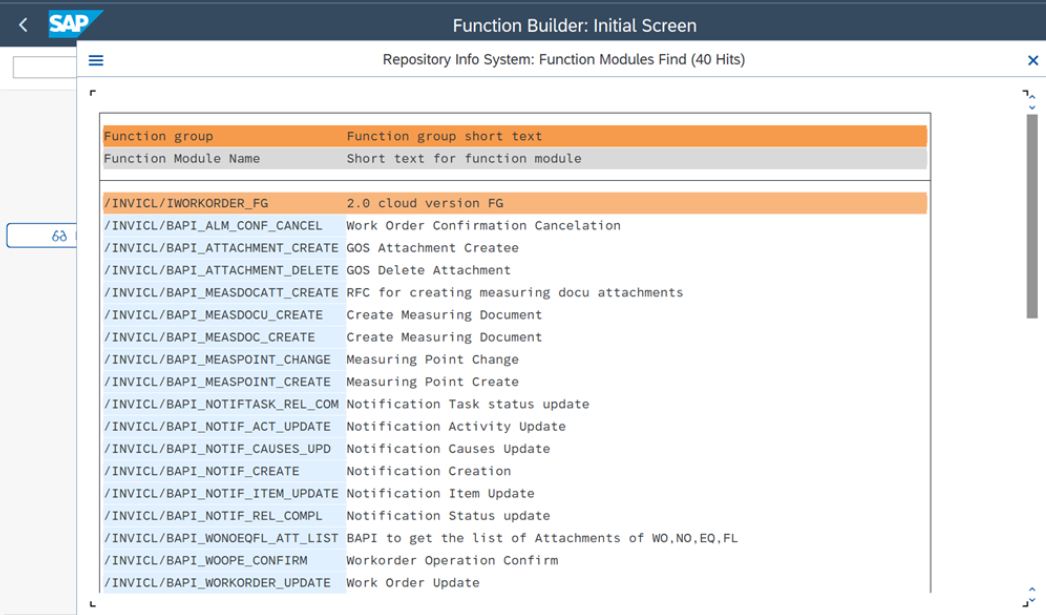
- Press <kbd>F4</kbd> to view available function modules.
-
Capture a screenshot of the list for validation and reference.
Verify Installed Add-Ons For SAP Gateway Systems
- Log in to the SAP Gateway system.
- Execute transaction code SE24.
- In the object type field, enter /INVICL/*.
-
Press <kbd>F4</kbd> to display object classes.
Figure 2. Verify Gateway Addons 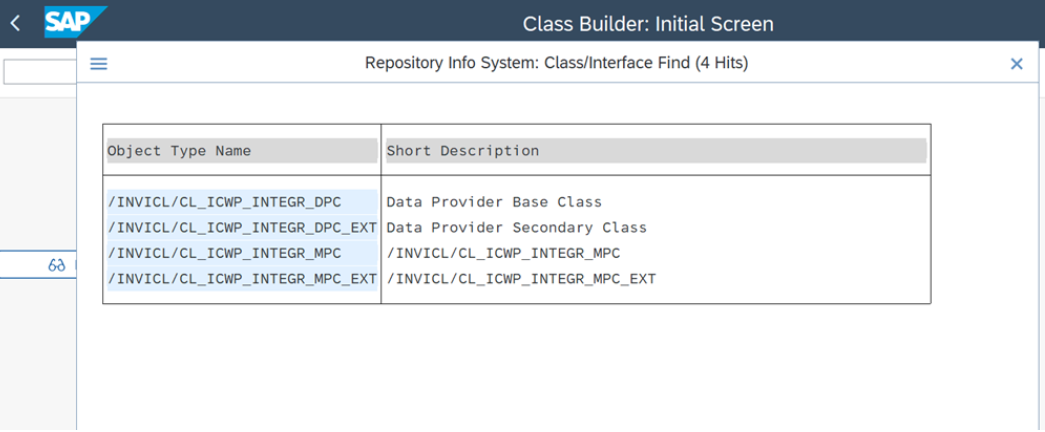
The iCWP Integration Suite add-ons are installed and confirmed in ECC and Gateway systems.