
Update Round Plans in Bulk
Export existing round plans to Excel, update the required details, and upload the file to apply multiple changes at once. This simplifies large-scale updates such as asset changes, route modifications, component updates, or logic adjustments.
You can export existing round plans to Excel and update them in bulk. This helps reduce effort when you need to make a large number of updates when new assets, route changes, are updated or component updates, or logic changes happen.
To update Round Plans in Bulk:
- Click the More icon (three dots) next to the Create button on the Round Plans screen.
- Select Export Round Plans as Excel.
- Select the round plans you want to update from the list.
- Click Export to download the Excel file.
- Update the required round plan and task details in the exported Excel file.
- Click the More icon (three dots) again and select Mass Update via Excel after completing the updates.
- Select the Plant for which the round plans are to be updated.
-
Select the updated excel.
Figure 1. Bulk Update Round Plan 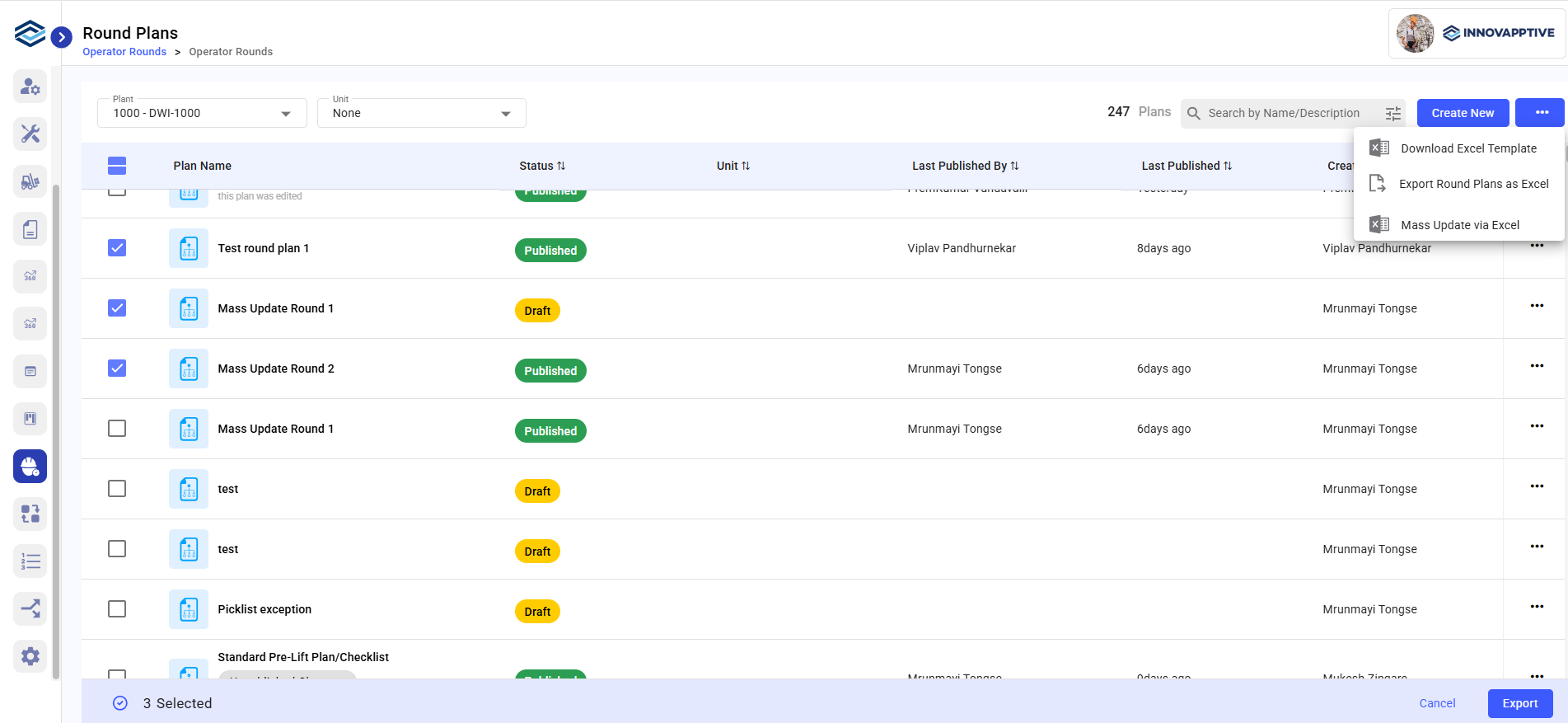
-
A confirmation message appears:
- “Scheduling Completed” if the upload is successful.
- “Failed to Schedule” if there are errors.
If scheduling fails, you can download the failed Excel file to review the error details, update the incorrect fields as per the failure message, and upload the corrected file again.