
Blind Count Inventory at Warehouse Level
Note:
The system will automatically check an item once the quantity
is entered or when a zero count is selected.
To execute blind count:
- In the Home screen, tap Cycle Counting.
- Tap WM Blind Count.
- Enter the search criterion like Warehouse Number and Src. Storage Type.
-
Tap Manual to enter the bin number manually.
Or tap the Scan icon to scan the bins.
Figure 1. Blind Counting Inventory 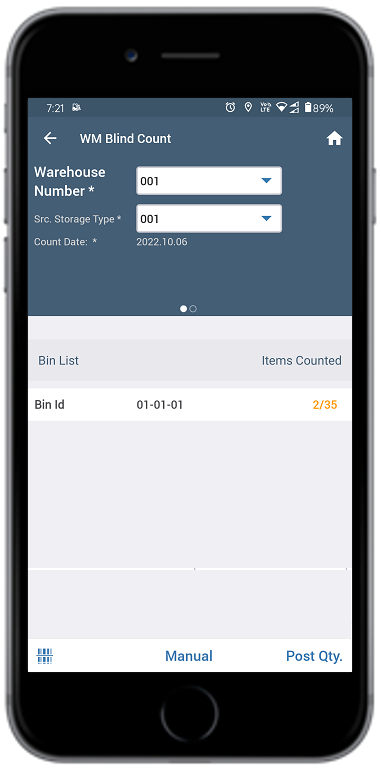
- Enter / scan the bin number in the Enter Bin Number pop-up.
-
Tap OK.
You can see the material that is available in the selected bin.
-
Enter the required quantity in the Count Qty field.
Or select the Zero Count checkbox if the quantity is zero.
Figure 2. Enter Quantity 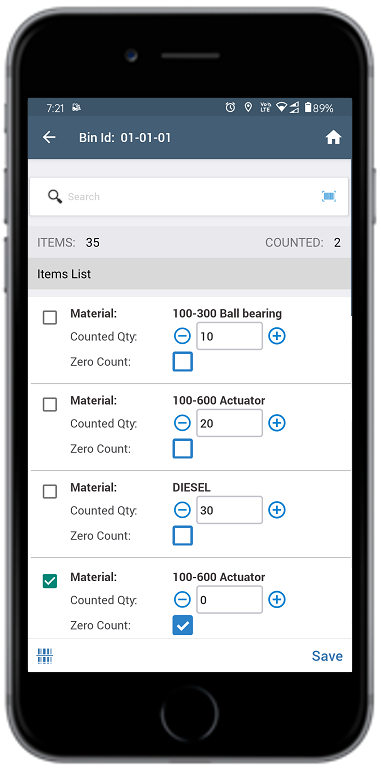
- 8. Tap to add the Unit of Measurement (UoM).
- Tap Save.
-
Tap Post Qty next to the Manual button.
A message appears confirming that the Inventory Document is created successfully and you can see the bin with counted items.You can sort inventory records based on custom bins while performing blind counts, cycle counts, and inventory adjustments.Note:To delete the bin, swipe left on the bin and tap the Delete icon.