
Configure Offline Toggle Switch and Network Timeout
Enable the offline toggle switch using the RACE configurator.
To enable the
offline switch:
Login to the RACE application.
Click Scoping on the left panel.
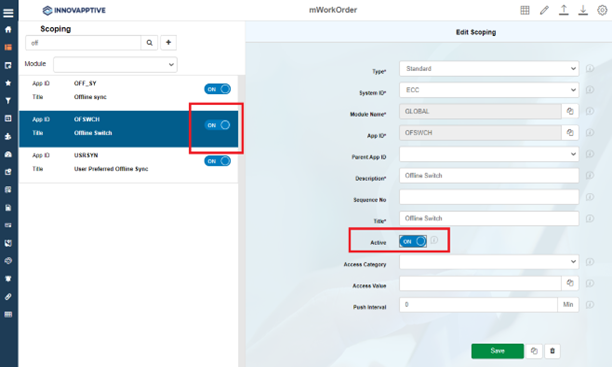
Enter the OFSWCH App ID in the search field.
Select the OFSWCH App ID from the search results on the left side.
In the Edit Scoping section, turn ON the Active toggle
switch.
Figure 1. Enable Offline Toggle Switch
Click Save.
The change is made in the Development environment. Now you need to move it to
the production environment.
In the Assign Transport Request window, select the transport from
Customizing Request options.
Click Submit.
Whenever a maintenance technician is in a location
where there is low internet connectivity, the ERP servers do not respond to
technicians' mobile devices in the defined time. The application then prompts a
warning message to switch to offline mode. You can set the defined time in RACE
using the Network Timeout option.
To configure the Network Timeout
rate:
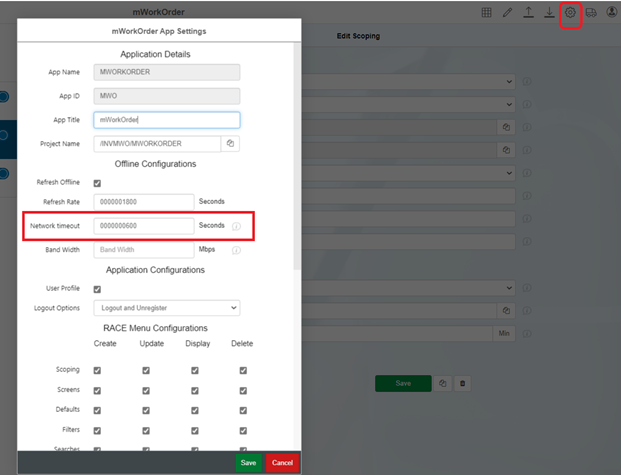
Click the Settings icon on the top panel.
Under Offline Configurations sections, in the Network Timeout field,
enter the value as 0000000120.
Figure 2. Set Network Timeout Value
Click Save.
In the Assign Transport Request window, click Submit.