Skip TO Confirmation screen and accelerate TO Confirmation process
When you have huge number of transfer orders to confirm, you can configure to skip the TO Confirmation success screen and automatically navigate to the search screen and scan the barcode with transfer order number to go to the transaction screen to confirm the orders.
Note: This feature is applicable for
mInventory.
To use this feature, ensure you:- Enable the App ID: NOSSN in RACE™ Scoping.
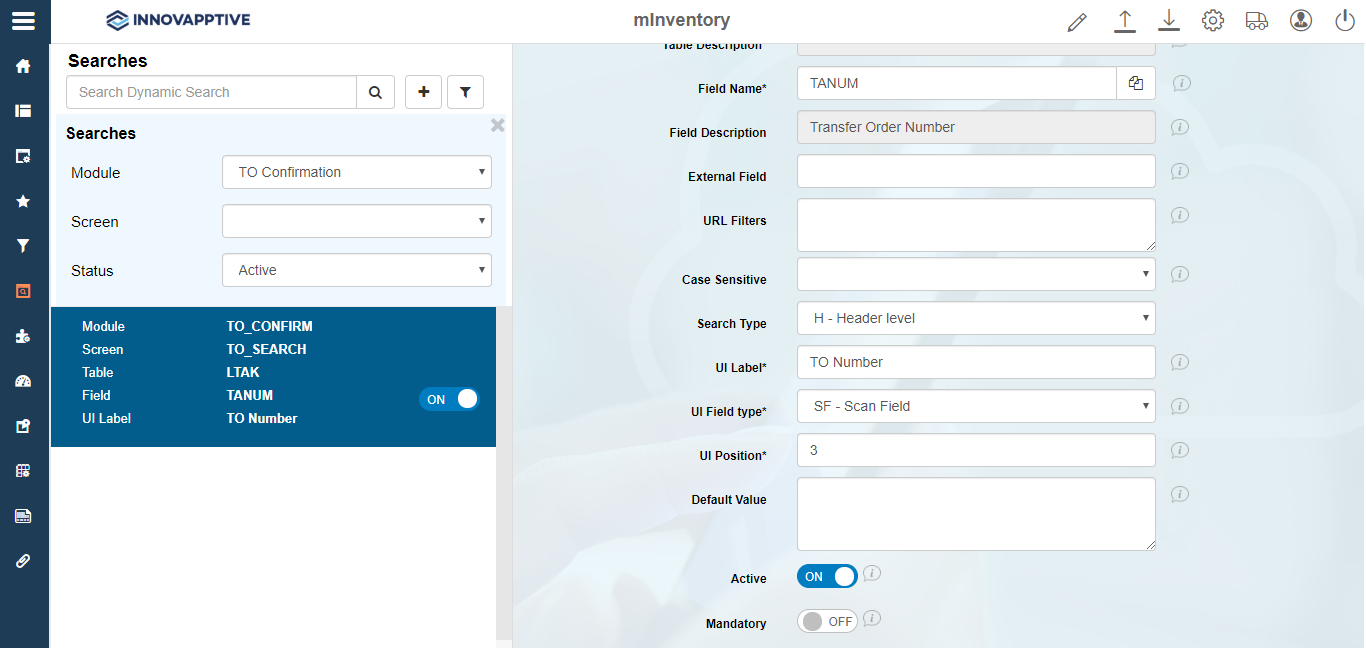
- Configure the TO Number field as Scan field in RACE™ Searches.
-
Click the Filter
 icon and select TO Number in the Module field.
-
In the Edit Search Field pane, ensure the following properties are
entered:
Table 1. Scan field attributes for TO Confirmation Field Value Module TO Confirmation Screen TO Search Category Extension Table / BAPI Name LTAK Table Description WM transfer order header Field Name TANUM Field Description Transfer Order Number Search Type H - Header Level UI Label TO Number UI Field type SF - Scan Field UI Position 3 Figure 1. Search Field Configuration