
Assign a Work Order at Header and Operation Level
You can assign work orders and operations within a work order to different technicians for more granular task management.
- In the Maintenance Control Center screen, click Assign for the desired work order.
-
In the Assign Work Order window:
- Select the Work Center from the drop-down.
- Select Assignee from the drop-down list.
- Click Assign.
To assign a work order at the operation level:
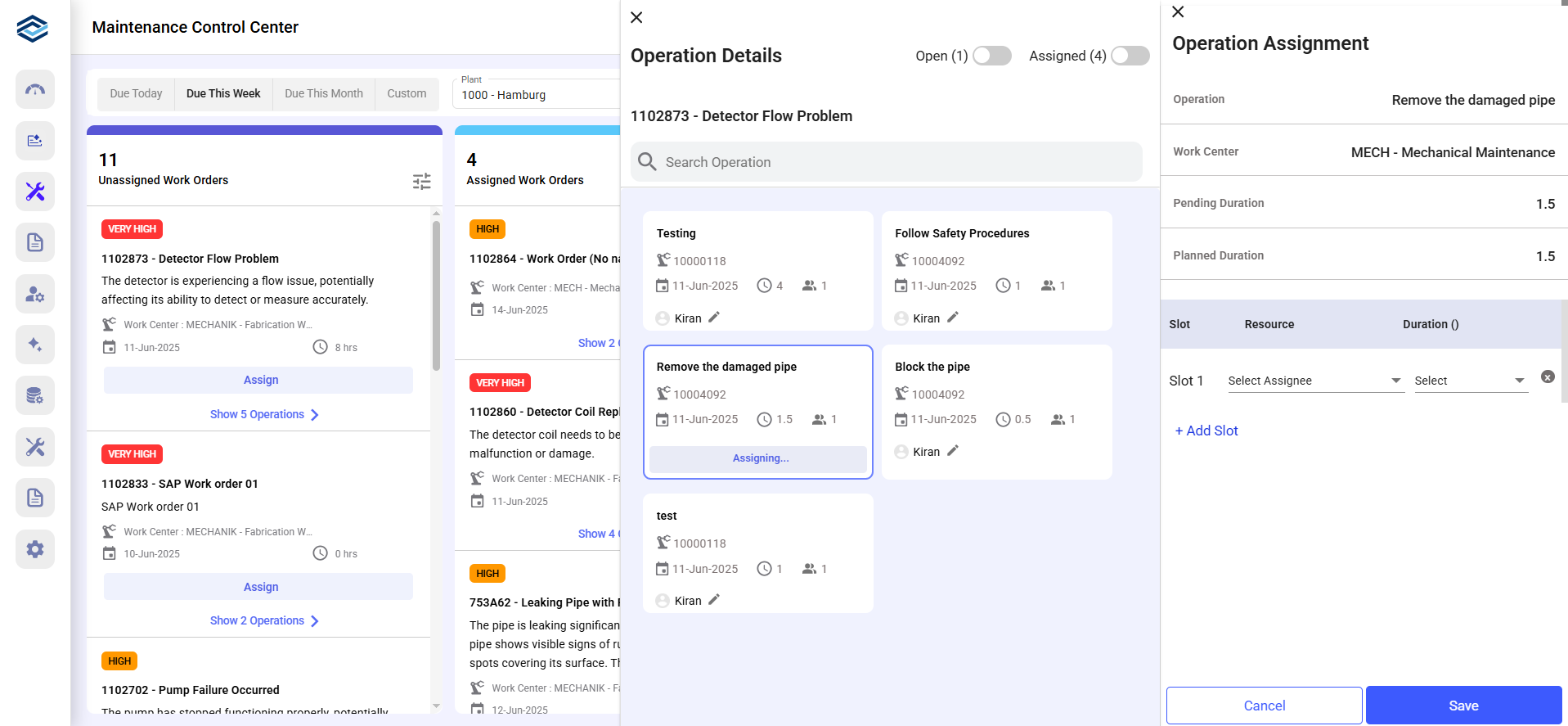
- In the Maintenance Control Center screen, click Show <X> Operation(s) for the desired work order.
-
In the Operation Details window, click Assign
Technician on the operation widget.
-
In the Operation Assignment window:
- Select a technician from the Resource drop-down. (The resources list is displayed based on the Plant).
- Select the operation duration.
- Click Add Resource to assign multiple resources if needed.
- Click Save.
Note:- Click Edit next to the technician's name to make changes.
- You can change the assignee until the work order is marked as Completed.