
Use the Maintenance Control Center (MCC)
The Maintenance Control Center (MCC) is a central module within the iMaintenance application that helps supervisors efficiently track and manage work orders and operations.
In this module, you can,
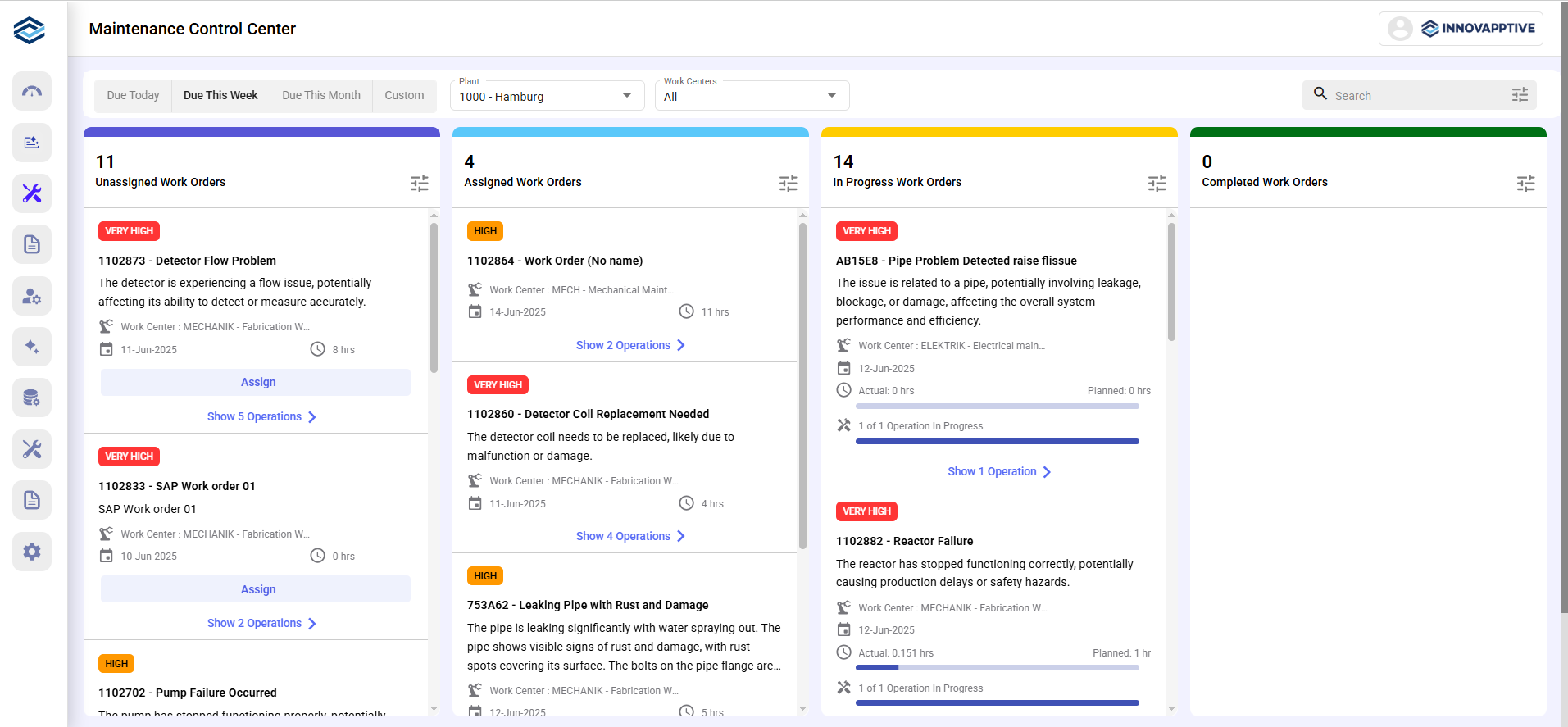
- View all work orders, categorized by status and sorted by start date.
- Assign or reassign work orders and individual operations.
- Filter, search, and monitor real-time progress.
- Optimize scheduling, resource utilization, and task completion.
View Work Orders by Status
Work orders are categorized into the following tabs:
- Unassigned Work Orders: Not yet assigned to any technician.
- Assigned Work Orders: Assigned but not yet started.
- In Progress: Currently being executed, showing planned vs. actual hours.
- Completed: Finished work orders with detailed performance data.
Search and Filter
You can:
- Use the Search bar (top-right) to find specific work orders.
- Apply filters by clicking the Filter
icon, including:
- Date ranges: Due Today, Due This Week, Due This Month, Custom.
- Plants, Revision, Planner Group, and Work Centers.
- Priority levels: Very High, High, Medium, Low.
Configure Fields
You can view, add, or remove fields based on templates defined in RACE, without affecting existing mobile implementations.
To Configure:
- Click the Configuration icon next to the Search bar.
- Under the Field Configurations tab:
- Click the Add Field button to add the fields you need.
- Adjust fields order using the Up and Down arrow icons.
- Delete unnecessary fields using the Delete icon.