
Archive and Restore Instructions
Archive instructions that are no longer in use and restore them whenever they are needed again.
Archive Outdated Instructions
Use this when equipment is decommissioned, procedures are replaced, or jobs are no longer performed.
To archive instruction:
- Under the Published tab, locate the instruction you want to archive.
-
Click the More icon on the instruction thumbnail and select
Archive.
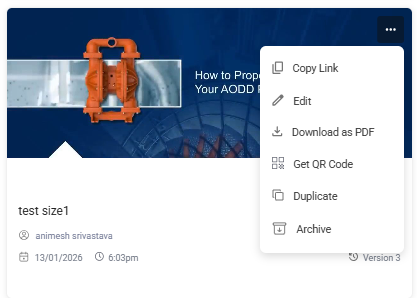
- The instruction is removed from the Published list.
Restore Archived Instructions
To restore archived instruction:
- Click the Archive tab.
- Locate the instruction you want to restore.
-
Click the More icon on the thumbnail and select
Restore.

- The instruction returns to the Published list.