
You can set the data filters from the app to fetch a specific set of records. Only
the required data is fetched for both online and offline use. This feature also helps
improve the app performance and reduce the offline sync time.
Synchronize and retrieve the delta records from the backend that is required to
complete tasks either in online or offline mode. This feature drastically reduces
the data synchronization time.
To download the data that is needed for your shift:
In the Home screen, tap the User Profile icon.
Tap User Preferences.
Figure 1. User Preferences Screen
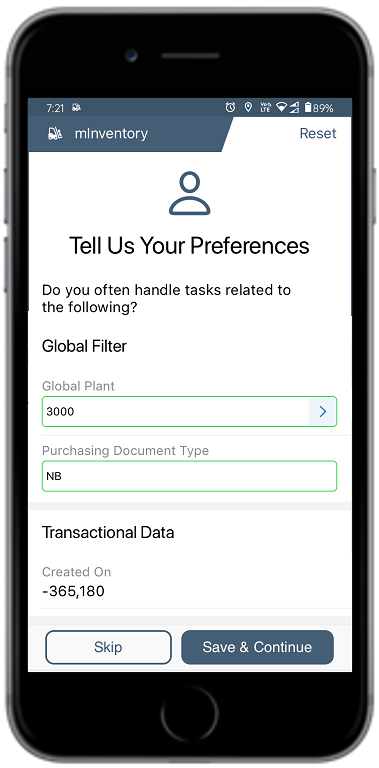
In the Tell Us Your Preferences screen, select the Master Data
and Transactional Data that you want to download.
Tap Save when done.
The Progress Bar screen displays the sync status with the success or failure
indication.
Note:
Reset user preferences and re-enter them to fetch relevant
data.
If you select the Online option, Sync in the Background
button appears and you can tap that and continue with your work. The
data downloads onto your device in the background while you perform
your tasks.
If you have chosen the Offline option, Sync in the
Background option will not be available, and you must wait
till the entire data is downloaded onto your device.
When the application switches to offline mode, the header turns red
and displays "OFFLINE" to indicate the mode change.