
To unpack delivery from container:
-
In the Home screen, tap Remote Logistics Management.
-
Tap Pack Delivery (o3o_PACK03).
-
Enter the search criterion.
-
Tap Search.
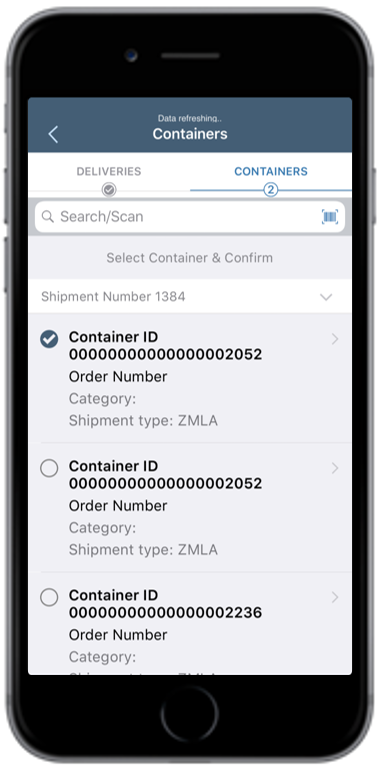
Figure 1. Select Container
-
In the Containers tab, tap on the shipment.
-
Select a Container ID.
Figure 2. Select Deliveries
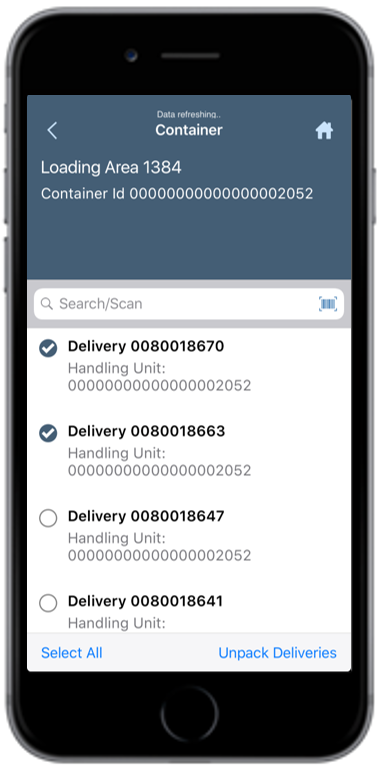
Note: Container ID is auto selected when you scan the value by tapping the
barcode icon on the fuzzy search bar.
-
Select the checkbox corresponding to the Delivery Number.
-
Tap Unpack Deliveries.
A message appears confirming that the selected delivery is removed from the
container.
The selected deliveries are removed from the container.