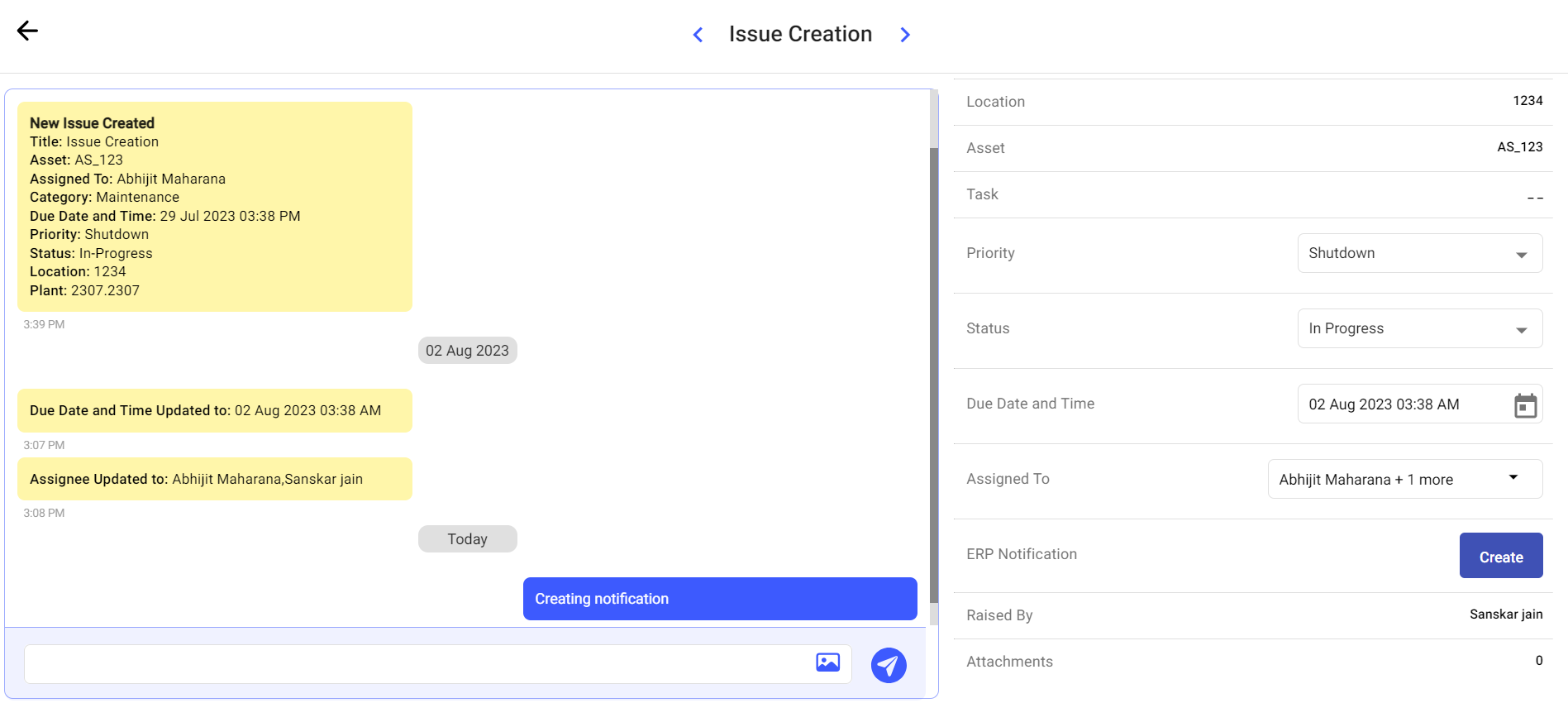
Create an ERP notification when a round finding must enter the organization’s enterprise maintenance process for further planning or execution.
For example, while conducting maintenance checks, if you observe that the bearings
in a pump are not working as expected, you can create an issue and convert it into a
notification and then the notification number displays in the back-end ERP system.
To
create a notification for an asset:
Click the Observations section on the left pane.
Click the Issues tab.
Click and select Show Details of the
selected issue.
or
Double-click the issue to open.
The log history window is displayed.
Figure 1. Create a Notification
Click the Create button in the ERP
Notification field.
An alert pop-up with following options is displayed:
Show Issues with Notifications: Click the
option to view the history or previously raised notifications
against the asset/location.
Create New Notification Anyway: Click the
option to create or raise a new notification.
Cancel: Click the option to cancel the
notification creation.
The notification is created in the back-end with the notification
number.
The ERP Notification request is created or the existing notification history is displayed, depending on the selected action.
Next: Return to shift monitoring and use the available notification history to follow the enterprise-maintenance record.

 and select Show Details of the
selected issue.
and select Show Details of the
selected issue.