
Review Scheduled Round Plan Details
Open a scheduled plan or round when you need its schedule, assignment, progress, task, and PDF details before taking action.
To view round plans list and round plan details:
-
Click
 and select Show Rounds for
the scheduled round to view.
You can view the list of all scheduled rounds.
and select Show Rounds for
the scheduled round to view.
You can view the list of all scheduled rounds. -
Click and select Show Details
for the scheduled round to view.
You can view the round details on the right side. Click View PDF to view the details in PDF or click Download to download the details in PDF format. You can also click the links inside the PDF to view and download the attachments like videos, audio, and documents. For more information, see Configure Round Plan Details PDF.
Note:Select the reason in the Reason column for the Overdue round.Figure 1. View Round Details 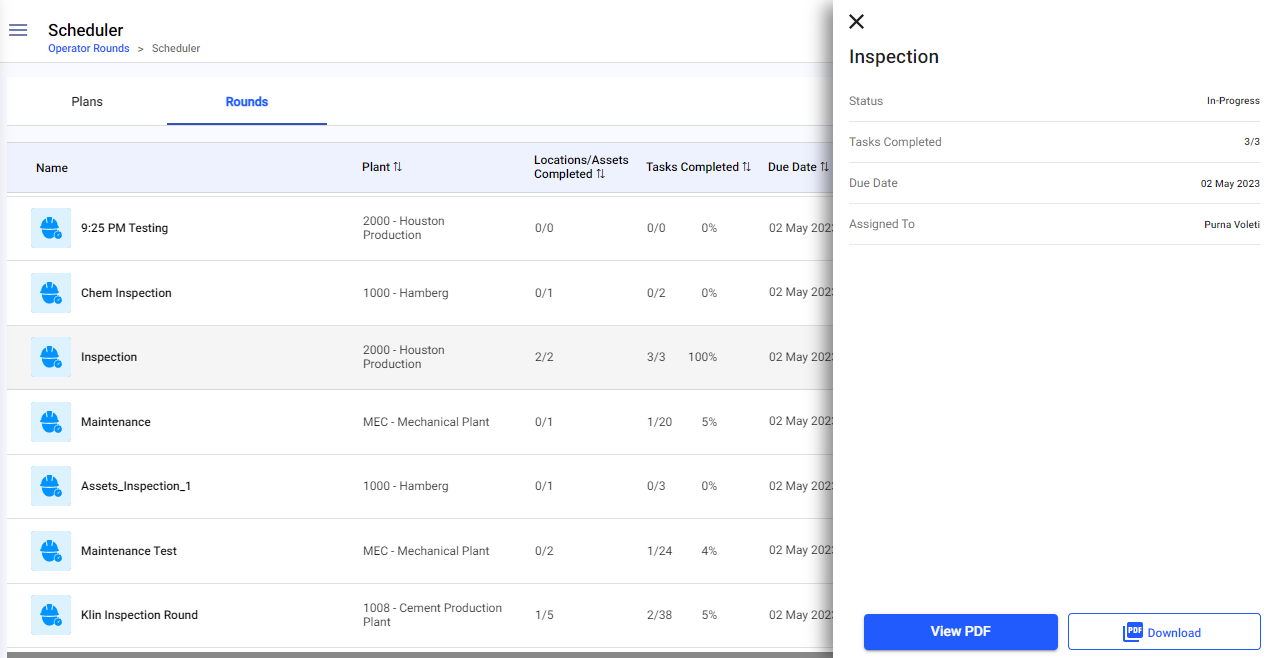
The selected plan or round details are displayed and can be reviewed or downloaded as available.
Next: Return to Investigate Rounds That Need Attention and record the required follow-up.