Publish Maximo work order events through INNO_WO_mRounds to the mRounds Kafka endpoint.
The Maximo integration components are set up as described in Connect to Maximo in the iMaintenance Deployment & Setup Guide. This task uses:
The INNO_GETWO object structure, with its custom attributes and relationships
The integration controls INNOSKIPSITE, MAINT_LOC_EXCLUDE, and MAINT_LOC_EXCLUDE1
The Kafka certificate, the KAFKA message provider, and the queues CQIN, CQOUT, and SQOUT
The Maximo Kafka cron tasks
The Innovapptive infrastructure team has supplied the Kafka bootstrap server, port, user name, and password for mRounds.
This is advanced backend setup in Maximo. It is separate from outbound Work Orders, which you configure in Integrations Manager.
Maximo publishes work order changes through INNO_WO_mRounds to the Kafka topic WOTopicMROUNDS, which mRounds reads. The direction is Maximo to mRounds. Values in angle brackets are deployment inputs.
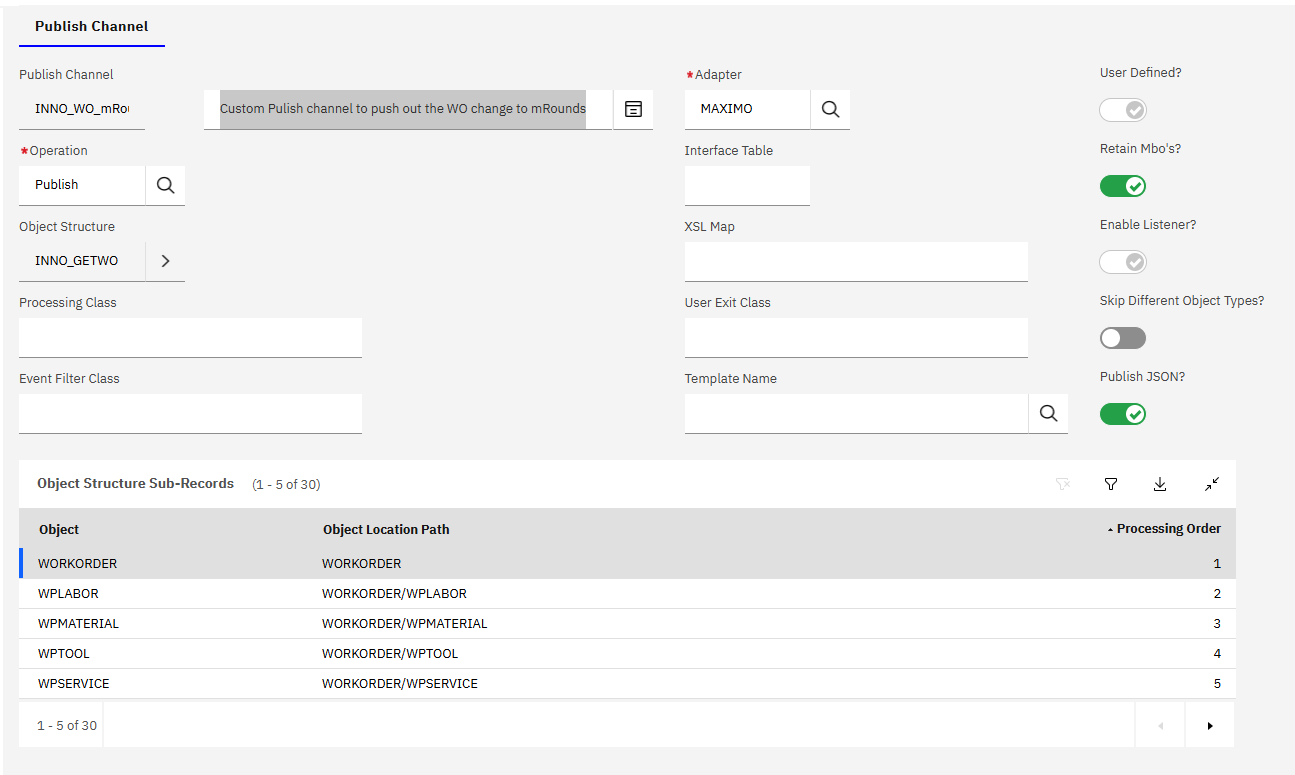
In the Publish Channels application, create a publish channel with the following values.
Field
Value
Publish Channel
INNO_WO_mRounds
Description
Custom Publish channel to push out the WO change to mRounds
Operation
Publish
Object Structure
INNO_GETWO
Processing Class
Event Filter Class
Adapter
Maximo
Interface Table
XSL Map
User Exit Class
Template Name
Retain Mbos
1
Enable Listener
1
Skip Different Object Types
0
Publish JSON
1
Figure 1. INNO_WO_mRounds publish channel
Associate the integration controls INNOSKIPSITE, MAINT_LOC_EXCLUDE, MAINT_LOC_EXCLUDE1 with the publish channel.
For every processing rule below, select Apply on Primary Object Insert, Apply on Primary Object Update, and Apply on Primary Object Delete. Configure each rule on the primary object of the object structure.
Create the processing rule INNO_SKIP2.
Rule
Description
Sequence
Action
Enabled
INNO_SKIP2
Skip outbound integration events for transactions inbound from Maximo Mobile. - Innovapptive
1
SKIP
Y
Add/Modified Conditions
Condition
XML Field Evaluation
Object Field Evaluation
Object Set Evaluation
Control Evaluation
10
Y
N
N
N
20
Y
N
N
N
XML Field Evaluations for Condition 10
Field
Evaluation Type
Evaluate When
Integration Control
Value
CHANGEBY
EQUALS
ALWAYS
MROUNDS
XML Field Evaluations for Condition 20
Field
Evaluation Type
Evaluate When
Integration Control
Value
SITEID
NOTEQUALS
ALWAYS
INNOSKIPSITE
Create the processing rule INNO_SKIP3.
Rule
Description
Sequence
Action
Enabled
INNO_SKIP3
Skip the Transactions when WOCLASS != "WORKORDER" - Innovapptive.
2
SKIP
Y
Add/Modified Conditions
Condition
XML Field Evaluation
Object Field Evaluation
Object Set Evaluation
Control Evaluation
10
Y
N
N
N
XML Field Evaluations for Condition 10
Field
Evaluation Type
Evaluate When
Integration Control
Value
WOCLASS
NOTEQUALS
ALWAYS
WORKORDER
Create the processing rule INNO_3M_SKIP2.
Rule
Description
Sequence
Action
Enabled
INNO_3M_SKIP2
Skip Transactions of some business lines -3M – Innovapptive
3
SKIP
Y
Add/Modified Conditions
Condition
XML Field Evaluation
Object Field Evaluation
Object Set Evaluation
Control Evaluation
10
Y
N
N
N
20
Y
N
N
N
XML Field Evaluations for Condition 10
Field
Evaluation Type
Evaluate When
Integration Control
Value
SITEID
EQUALS
ALWAYS
<site-id>
LOCATION
ISNOTNULL
ALWAYS
LOCATION
EQUALS
ALWAYS
MAINT_LOC_EXCLUDE
XML Field Evaluations for Condition 20
Field
Evaluation Type
Evaluate When
Integration Control
Value
SITEID
EQUALS
ALWAYS
<site-id>
LOCATION
ISNOTNULL
ALWAYS
LOCATION
LIKE
ALWAYS
MAINT_LOC_EXCLUDE1
In the End Points application, create the endpoint INNO_WO_MROUNDS.
End Point
Description
Handler
Consumed By
INNO_WO_MROUNDS
Custom Kafka topic for WO transactions to mRounds
KAFKA
INTEGRATION
Property
Value
Encrypted Value
Allow Override
BOOTSTRAPSERVERS
<bootstrap-server>:<port>
N
ISTEXT
N
KERBEROS_SERVICE
N
KEYTABFILE
N
KEYTABPRINCIPAL
N
PASSWORD
<kafka-password>
N
SASL_MECHANISM
SCRAM-SHA-512
N
SECURITY_PROTOCOL
SASL_SSL
N
TOPIC
WOTopicMROUNDS
N
USERNAME
<kafka-username>
N
In the External Systems application, create the following external system.
System
Description
End Point
Enabled
mRounds
Custom External system to sync the MAS data with mRounds
Y
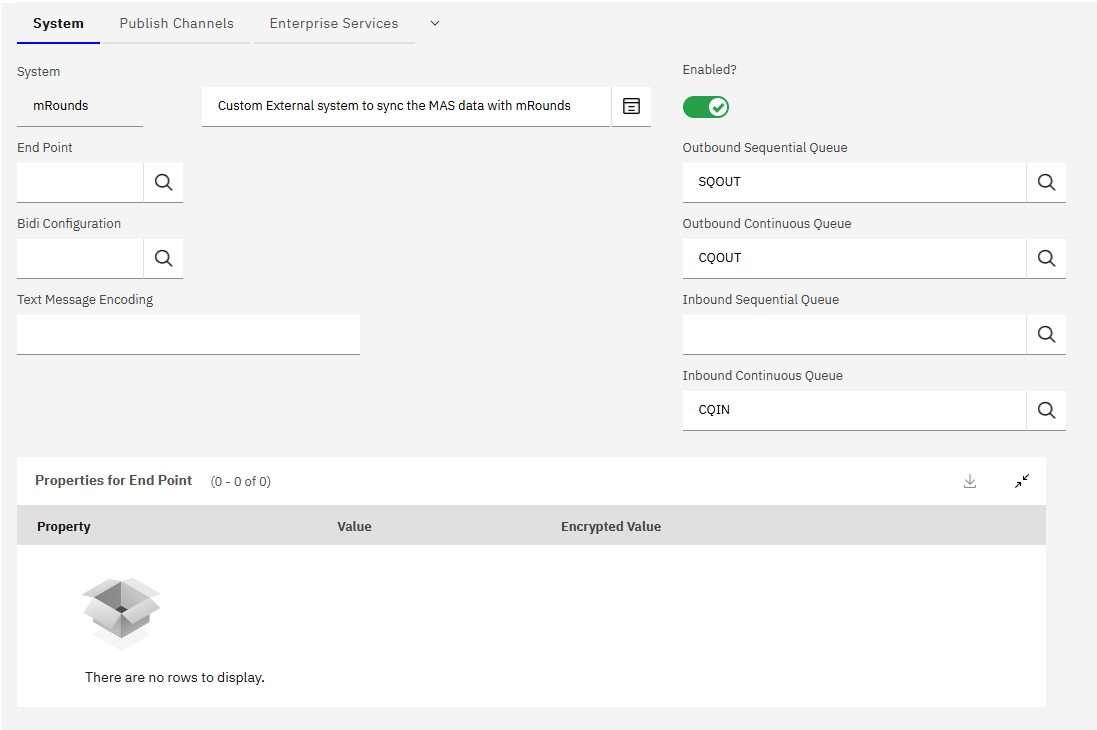
Set the queues.
Field
Value
Outbound sequential queue
SQOUT
Outbound continuous queue
CQOUT
Inbound continuous queue
CQIN
Figure 2. Queues of the mRounds external system
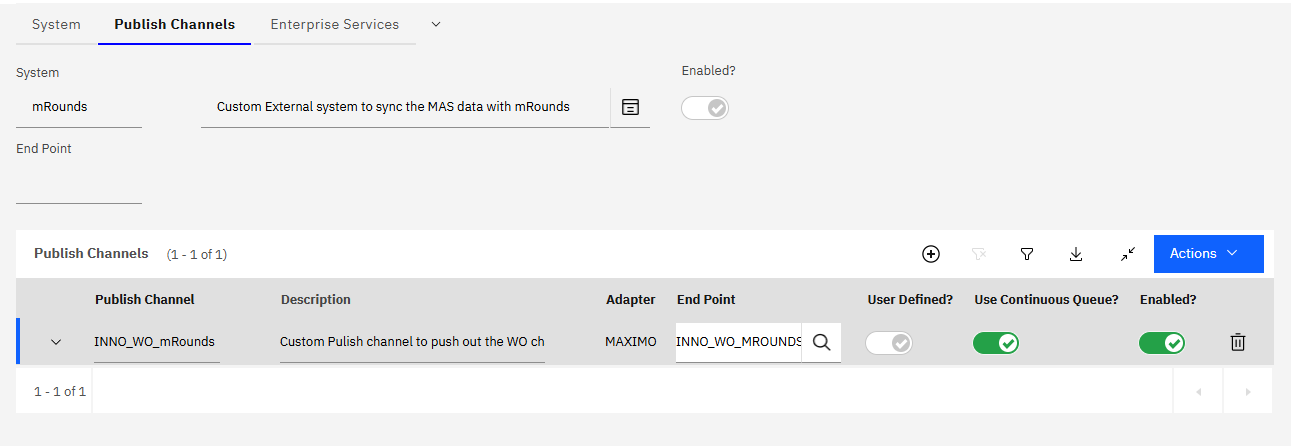
On the Publish Channels tab, add the following publish channel.
Publish Channel
Description
Adapter
End Point
User Defined
Use Continuous Queue
Enabled
INNO_WO_mRounds
Custom Publish channel to push out the WO change to mRounds
MAXIMO
INNO_WO_MROUNDS
Y
Y
Y
Figure 3. Publish channel of the mRounds external system