
Connect Shift Handover Reports to Platform Alerts and IMES
Show platform Alerts and IMES query results in mRounds Shift Handover Reports.
If your deployment uses Shift Handover Reports with platform Alerts or IMES, Shift Handover Reports can show platform Alerts and IMES query results on web and mobile. Both arrive over Kafka from the 2.0 platform. The Shift Handover service stores them and refreshes open reports about every 30 seconds.
- Alerts appear in the built-in Alerts section, and in custom widgets limited to one source system (for example, only Seeq).
- IMES results appear in custom widgets as tables (for example, IMES Material).
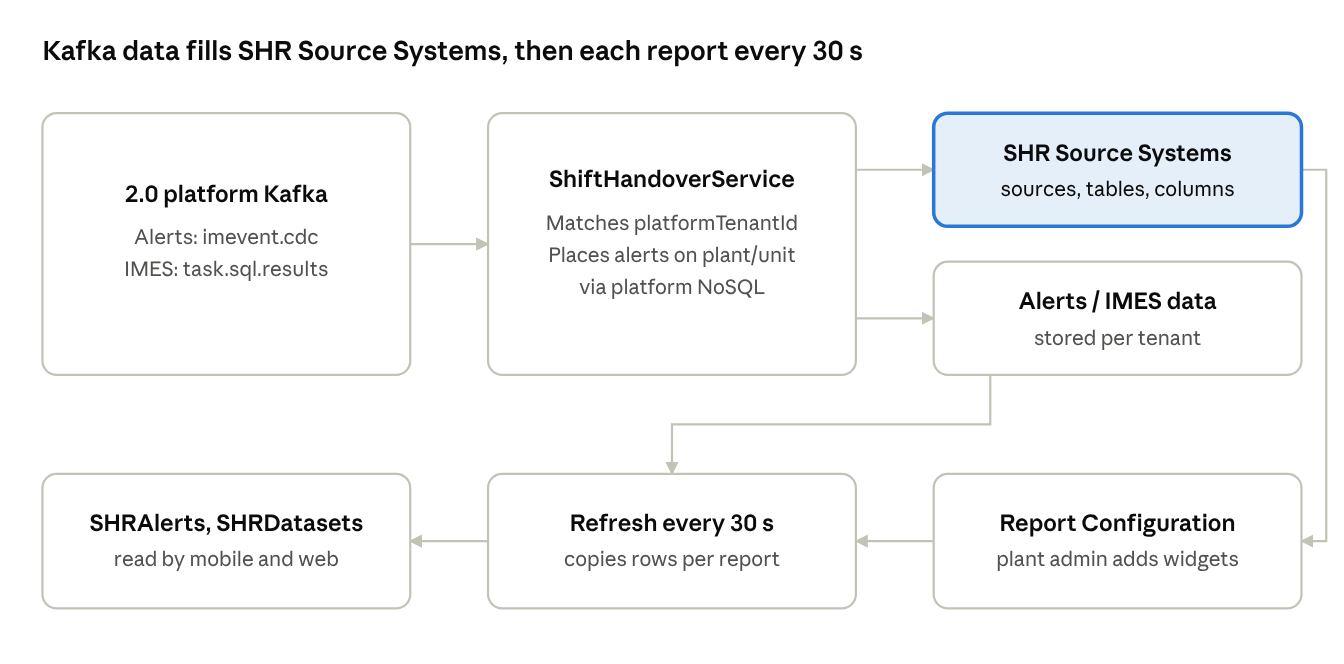
Source systems
The Source and Collection lists in Create Widget fill themselves from Kafka. Nobody enters them by hand.
- The first alert from a system (for example Seeq) adds that system, in lowercase, with one collection,
alerts, and its 12 fixed columns. Seeq and seeq stay one entry. - Each IMES query result adds or updates the IMES entry with that result's table name and columns.
A source or collection appears in the lists only after data for it has arrived at least once.
Report data and offline use
Each new alert or IMES result marks the reports for that shift. Within about 30 seconds, the report data is updated: SHRAlerts holds one row for each report, and SHRDatasets one row for each custom widget. Mobile synchronizes this data and can then show it offline.
The built-in Alerts section shows alerts from every source system. A widget for one source, such as Seeq, shows only that source's alerts.
An alert reaches a report only when the platform maps it to a plant: its platform taxonomy node must carry a DYNAMO external ID that matches a CWP asset, location, or plant.
Who sets it up
- The DevOps team runs the catalog migration, turns on the feature flags, fills the tenant configurations, links the tenant to the platform, and sets the Kafka consumers. See Set Up Platform Alerts and IMES for Shift Handover in the iMaintenance Deployment & Setup Guide.
- For IMES, the implementation team runs the iMES services that publish IMES results. See IMES Prerequisites for Shift Handover Reports.
- A plant admin adds the Alerts and IMES sections and widgets to each plant's report configuration. See Add Alerts and IMES Widgets to Shift Handover Reports.
- The implementation team and a plant admin confirm that IMES results reach reports. See Verify That IMES Results Reach Shift Handover Reports.