In the existing scenario, the inventory audit is performed against the inventory
records. The application supports the generation of the physical inventory documents for
blind count postings to speed up the cycle counting process. Once you enter the
respective material and/or batch codes and quantities against each of the line items and
post, a physical inventory document gets generated in the SAP system. This feature is
similar to the MI09 transaction in SAP.
To create a Blind Inventory
Audit:
In the Home screen, tap Consignment Audit.
Tap Blind Inventory Audit.
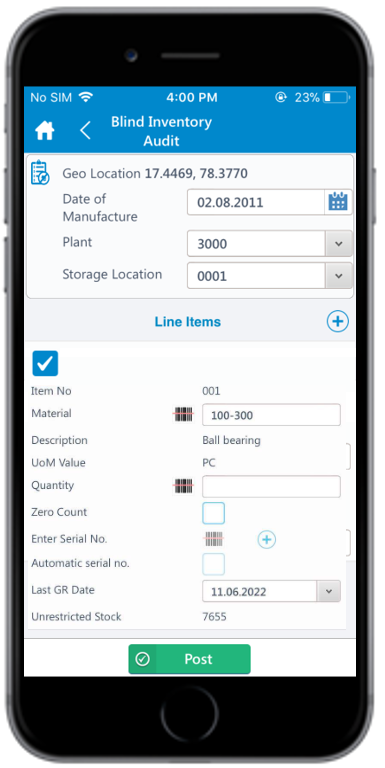
Figure 1. Blind Inventory Audit Details
Enter the required information in the following fields:
Geo Location: The current GPS location is auto
generated.
Date of Manufacture: Tap the field to select the
date of manufacture.
Plant: This is auto-populated. Tap the field to
edit the Plant number.
Storage Location: This is auto-populated. Tap the
drop-down to select Storage location from the displayed list.
Date of Last count: Tap the field to select the
date of last count.
Line Items: A default line item is displayed on the
Blind Inventory Audit screen. Tap the
Add icon in the Line Items section to
add more line items.
Tap the checkbox to select the line item.
Item No: The line item number is auto-populated and
grayed out.
Material: Tap the Scan icon to scan the Material
or tap the field to enter the Material Number.
Note:
You can
enable Combo Scan for this scan field. Combo Scan helps you
scan the barcode, capture data, and navigate automatically
to the transaction screen related to the value. For
information, see the Configure mInventory using RACE™
guide.
Description: Corresponding description is auto-populated
and grayed out.
UoM Value: Corresponding unit of measurement is
auto-populated and grayed out.
Quantity: Enter the item quantity.
Zero Count: Select this checkbox to zero the quantity. If
selected, the Quantity field is set to zero.
Tap Post.
A pop-up window appears asking you to confirm the posting of the record.
Tap Yes to post the record.
A message appears confirming that the record is successfully created.
The Blind Inventory Audit record is created, and a physical inventory document is generated in SAP.