
Set Your Work Context
Set the Plant, Unit, Position, and Shift you are working in. These four values decide which rounds and records reach your device.
Note:
You can choose preferences for the Plant, Unit, Position, or
Shift only when you are assigned to multiple plants, units, positions, or shifts. If you
are assigned to one plant, unit, position, or shift, the option is grayed out and the
Unit, Position, and Shift values are displayed based on the selected Plant. A grayed-out
option needs no selection, so move on to the next value you can change.
-
Select a Shift from the dropdown list.
Note:The Shift dropdown automatically updates based on your Plant, Unit, and Position selections.
- If only Plant is selected, the dropdown shows Plant-level shifts.
- If Plant and Unit are selected, the dropdown shows the Unit's shifts. If the Unit does not have custom shifts, Plant-level shifts are shown.
- If Plant, Unit, and Position are selected, the dropdown shows the Position's shifts. If the Position does not have custom shifts, Plant-level shifts are shown.
Figure 1. Select Plant 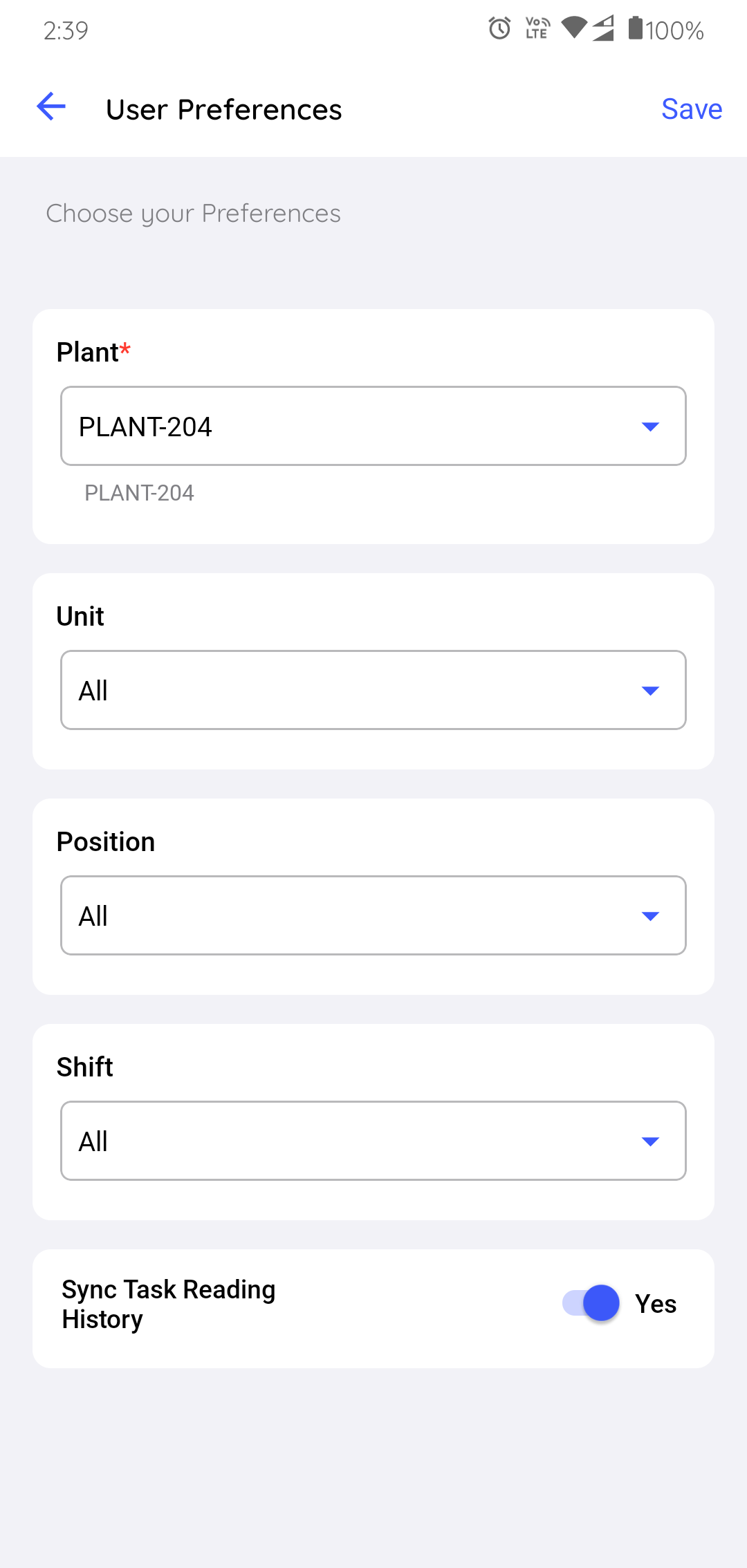
Your work context is set. Rounds and records for the selected Plant, Unit, Position, and Shift synchronize to the device, and the Rounds view stays scoped to the unit you are working in.
Next: Decide how much history comes down with it. See Choose What Data to Synchronize.