
Scan and Verify an Asset
Scan the asset when scanning is configured for the plant. Verification helps prevent readings from being recorded against the wrong equipment.
For example, if a pump-inspection round includes asset P-204, scan P-204 before recording its readings.
When configured: The Asset Scan option only appears when your current plant has scanning enabled. If you switch to a plant where scanning is disabled, the scan option does not appear.
To scan and verify:
-
Use your device to scan the asset's barcode or QR code.
The round tasks assigned to this asset are displayed.
Figure 1. Asset Details with Tasks 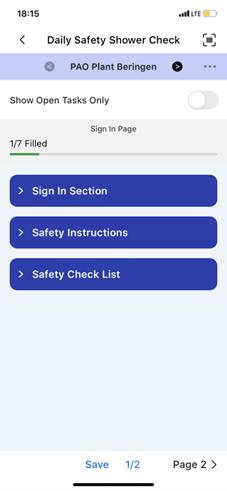
The asset is verified and its task list opens for you to record readings against.
When the asset cannot be scanned: Tap Skip in the top right corner and select the applicable reason:
- Out of service
- Damaged barcode
- Inaccessible location
- Turnaround period
- Other (specify reason)
Productivity tips:
- Move the Show Open Tasks Only slider to see only the tasks still needing a response.
- Use the Page 1, Page 2, Page 3 buttons to move between pages of tasks.
Next: After the correct asset is open, review the guidance and complete its tasks.