
About the Mobile Application Screens
The mobile application provides on-the-go access to manage permits, JHAs, work orders, and safety tasks directly from the field. The main screens are designed for quick visibility of pending actions, active work, and safety compliance, enabling faster decision-making and execution.
Monitor your Tasks (Home Screen)
The Home screen acts as the landing page of the mobile app and displays the user’s current workload and pending actions.
- Immediate attention items such as permits awaiting authorization or validation and provides a summary of pending permit actions based on user permissions.
- Total permits categorized by type (for example, Hot Work, Height Work, Work Authorization).
- Shift details and logged-in user role.
- Quick access to key modules from the bottom navigation.
This screen helps users quickly identify what needs action without navigating into individual modules.
Permits
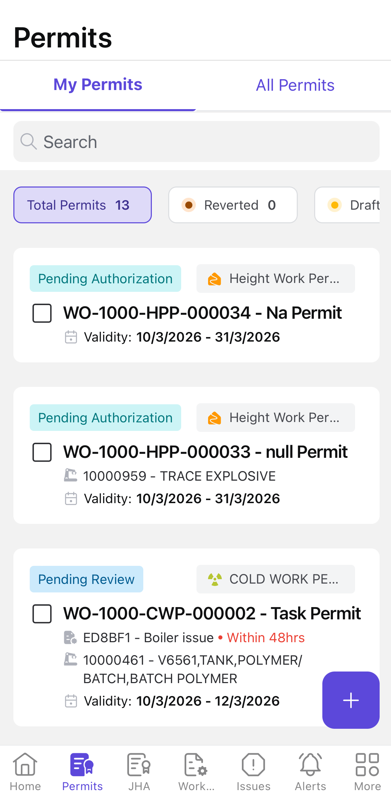
The Permits screen allows users to view and manage permits assigned to them or across the plant.
- View permits under My Permits and All Permits.
- Track permit status such as Draft, Pending Authorization, Reverted, and Active based on the roles and permissions.
- Search and filter permits.
- Open a permit to review details and take actions such as authorize, validate, or proceed based on role.
- Create new permits.
JHA
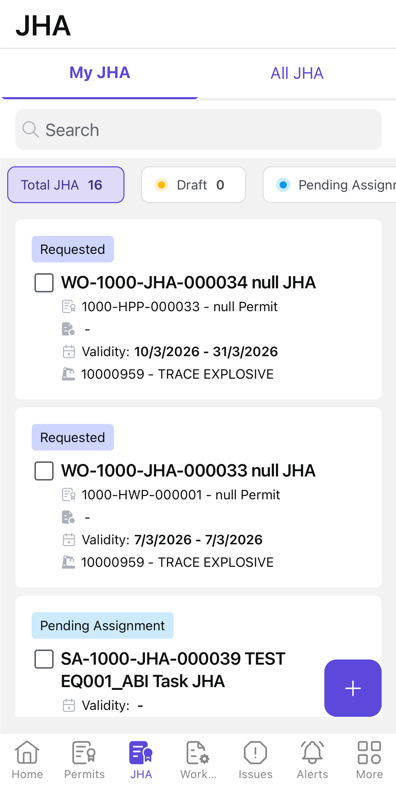
The JHA screen provides access to JHA linked to work activities.
- View JHAs assigned to them and all JHAs.
- Track JHA status such as Draft, Pending Assignment, and In Progress.
- Open a JHA to review job steps, hazards, and control measures.
- Perform field acknowledgement and validation as part of JHA execution.
- Create new JHAs
This screen ensures hazards are reviewed and acknowledged before and during job execution in the field.
Work Order – Permits View
The Permits tab within a Work Order shows all permits associated with that specific job.
- View permits linked to the selected work order.
- Track permit status such as Pending Authorization and Pending Field Validation.
- Open permits to review scope, safety details, and compliance requirements.
- Ensure required permits are in place before starting or continuing work.
This view helps ensure that work execution is always aligned with permit-to-work safety requirements.