
Post a goods issue for the components of an order, such as a work order.
In this module,
- Consignment stock appears only if the material is consignment-based.
- When a vendor is selected from the consignment dropdown, special stock type
"K" is auto-filled, reducing manual input.
- If the material is not consignment-based, the Vendor field is hidden.
To record movement of goods from Warehouse using an Order:
-
In the Home screen, tap Goods Issue.
-
Tap the Reference Document drop-down and select Order.
-
In the search screen, do a combo scan or manually enter details like Work
Order and Plant.
-
Tap Search.
In the search results screen, you can:
- Tap the Search field to search the order.
- Tap the Scan icon to scan a batch of line items.
- Sort and filter the records. For more information, see Sort Records and Filter Records.
-
Tap on the order for which you want to record the issue of goods.
Note: You can now view both unrestricted and consignment
stock based on the vendor.
-
Tap the Calendar
icon to modify the Posting
Date.
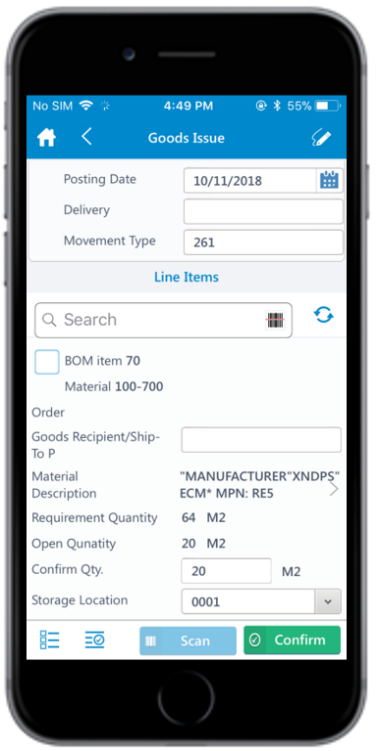
In the order details screen, the below fields are auto populated:
- Work Order
- Order Type
- BOM item
- Material
- Material Description
- Requirement Quantity
- Open Quantity
Figure 1. Goods Issue using Order
-
Select and enter this information for the line item(s):
- Confirm Quantity: This value is auto populated. Tap to modify the
value.
- Storage Location: Tap to select the storage location from the
list.
-
Tap the Signature icon to add your digital signature and enter the
following details in the Signature box:
- Phone Number: Tap to enter the telephone number.
- First Name: Tap to enter the first name.
-
Tap Confirm.
Tap Reset to erase and enter a new signature.
-
Tap Confirm.
A message appears asking whether you want to post the goods issue.
-
Tap Yes.
A message appears confirming that the Material Document <number> is posted
for the Order <number>.
You can select and send single or multiple Goods
Issue slips generated after posting via installed device
applications.
The goods issue is posted as a material document for the order.