Record Movement of Goods from Warehouse Using Stock Transport Order
When you need to transfer stock from one plant to another or between different
storage locations within a plant you use stock transport order. The goods marked for
movement are moved from a storage location and this movement from a storage area or a
warehouse is recorded using the stock transport order (STO).
You can scan a material barcode directly from the Item screen to locate and filter
the corresponding line item without first tapping the fuzzy search bar. For
batch-managed materials, scanning the material barcode in the Batch field also retrieves
and assigns the batch number, eliminating the need to enter it manually or select it
from the dropdown.
The Item Overview screen displays the Batch, Date of Manufacture,
and Shelf Life Expiration Date for batch-managed materials fields are displayed on,
providing additional batch traceability information.
To record movement of
goods from Warehouse using Stock Transport Order:
In the Home screen, tap Goods Issue.
Tap the Reference Document drop-down and select Stock Transport
Order.
In the search screen, do a combo scan or manually enter details like PO
Number and Supplying Plant.
Tap Search.
In the search results screen, you can:
Tap the Search field to search the Stock Transport Order.

 icon to modify the Document
Date.
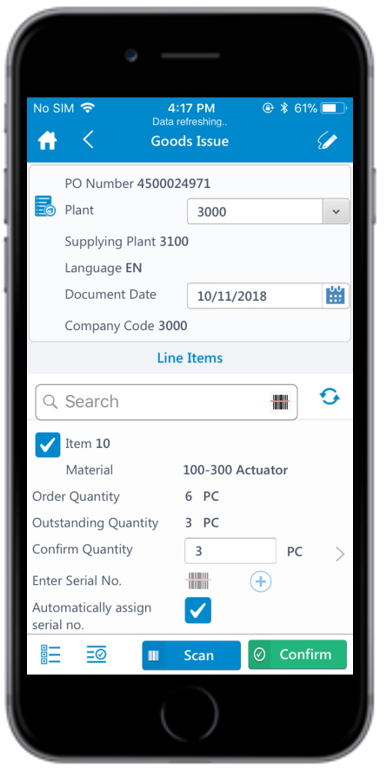
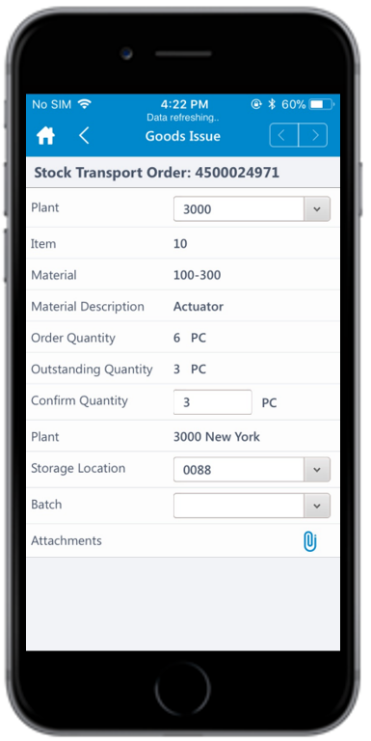
In the purchasing document details screen, the below fields are auto populated:
icon to modify the Document
Date.
In the purchasing document details screen, the below fields are auto populated: