
Work Acknowledgement
Work acknowledgement confirms that all assigned team members have reviewed and understood the job steps, associated hazards, and required control measures before executing the task.
To acknowledge the JHA:
- Go to the All JHA tab and select the JHA that needs to be acknowledged.
- Review the job steps, potential hazards, and control measures in the field.
-
Click Submit.
A dialog box appears stating “All assigned members must acknowledge before submission.”
-
Click Review Acknowledgement.
Figure 1. Review Acknowledgement 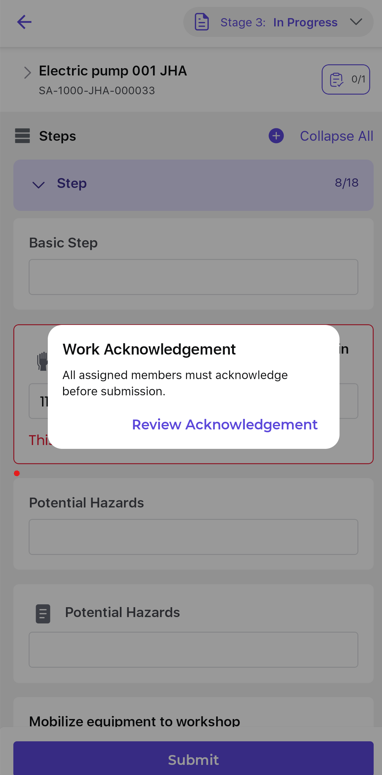
-
Change your status from In Progress to
Completed.
Figure 2. Change JHA Status 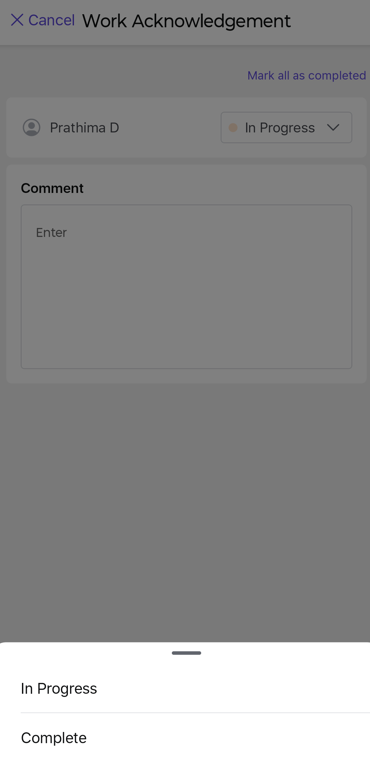
-
Add comments if required, and click Confirm.
Figure 3. Confirm Acknowledgement 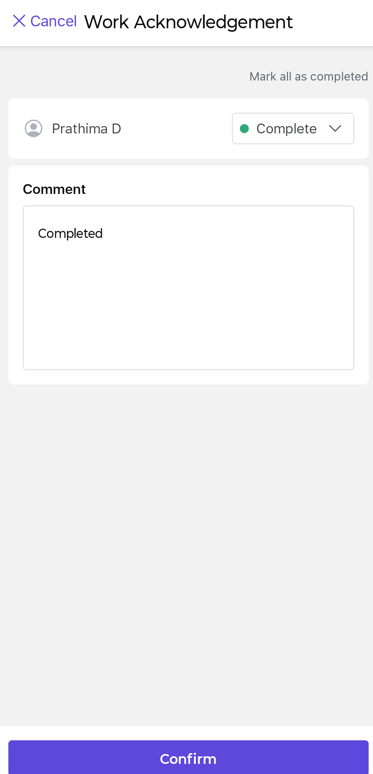
- After all assigned team members complete their acknowledgement, click Submit to proceed to the next stage.