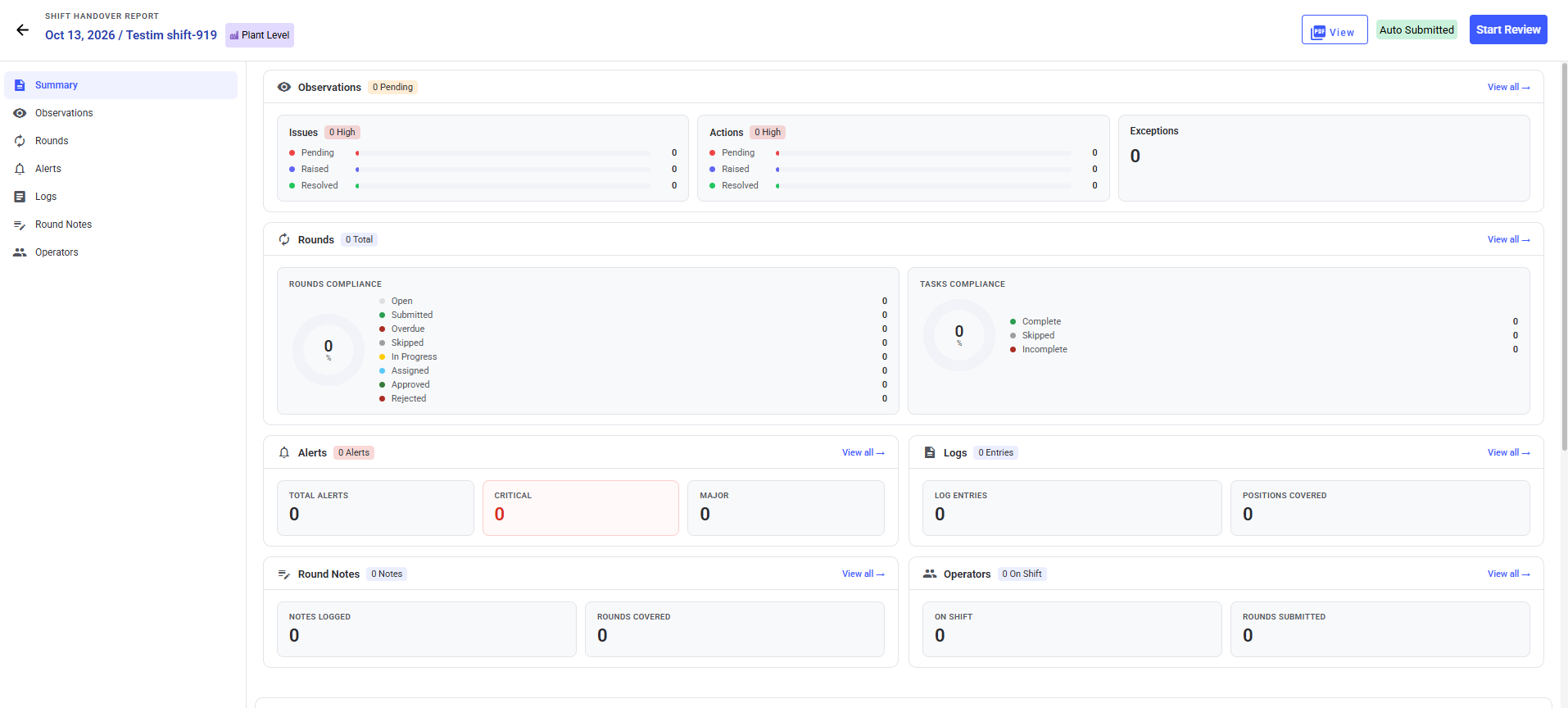
As the incoming Supervisor, review and accept the previous shift’s handover before taking ownership of open rounds, exceptions, Issues, Actions, notes, and attachments.
-
Expand Shift Handover and click
Reports.
-
Select a shift that has a Handover Status of Submitted.
-
Review the Summary tab.
-
Click Start Review at the top right.
-
In the Instructions section, review
Shift Notes, Standing
Instructions, and attachments.
-
Click Next.
-
In the Logs tab, review the shift logs and click
Next at the top right.
-
In the Rounds tab, view the progress of rounds and click
Next.
-
In the Observations tab, review the unresolved Exceptions,
Issues, and Actions, then click Next.
-
In the Alerts tab, review Open alerts, starting with Critical
ones, and click Next.
-
In the Notes tab, review the notes added for the round
during the shift and click Next.
-
In the Operators tab, review each Operator and the submitted
status of their rounds, then click Accept at the top
right.
-
In the Confirm Acceptance window, review the shift
acceptance details and click Accept.
An “Accepted” message appears. On the Shift Handover screen, the Shift Status
changes to Completed and the Handover Status changes to Accepted.
You now own any unresolved Issues, Actions, and open rounds carried over from the
previous shift.
Next: Monitor the Shift, beginning with compliance and exceptions.