
Update Round Plans in Bulk

Export, edit, and re-upload round-plan data when many plans require the same type of change. Bulk update helps keep large sets of plans consistent.

Export existing round plans to Excel and update them in bulk. Use this when a large number of plans has to change at once — for example, after new assets are added, or after route, component, or logic changes.

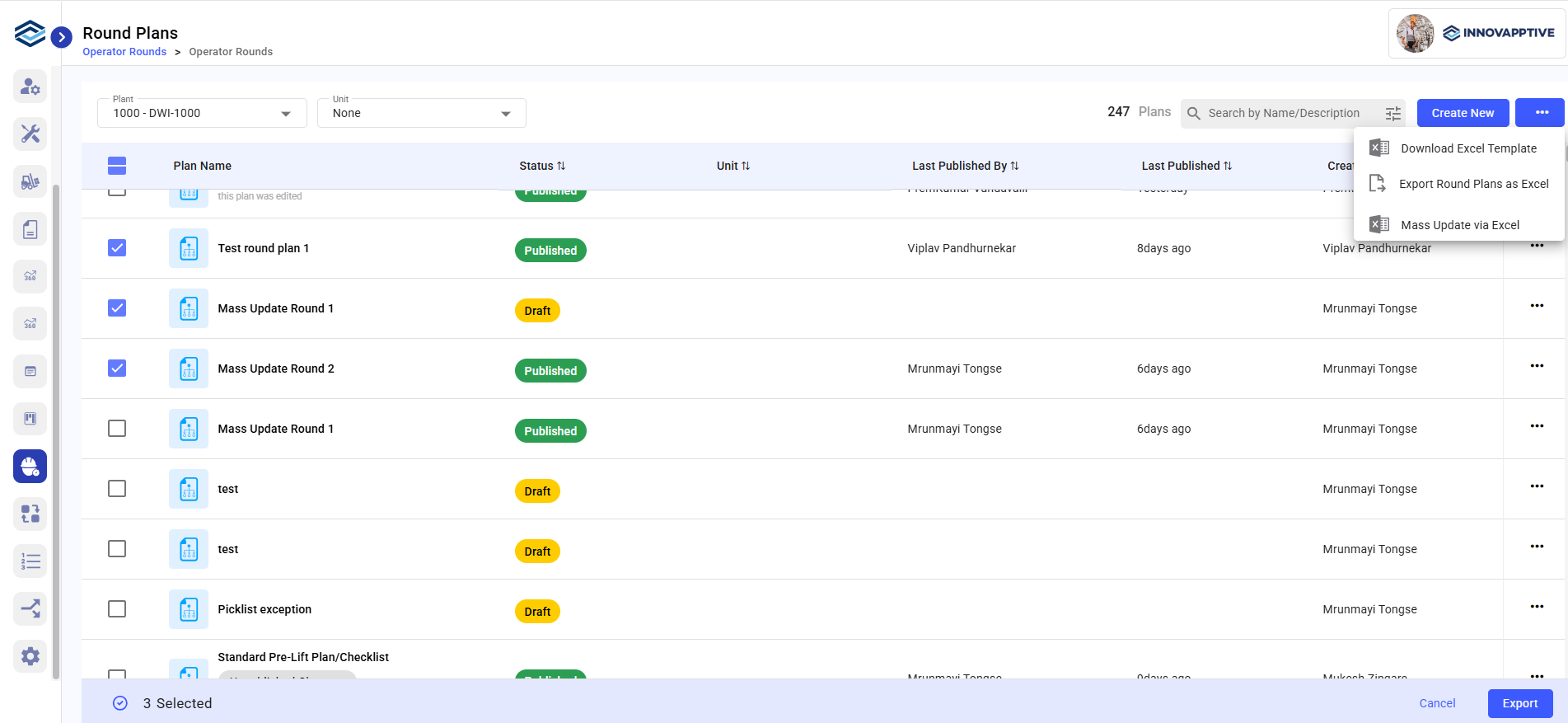
  1. Click the More icon (three dots) next to the Create button on the Round Plans screen.
  2. Select Export Round Plans as Excel.
  3. Select the round plans you want to update from the list.
  4. Click Export to download the Excel file.
  5. Update the required round plan and task details in the exported Excel file.
  6. When the updates are complete, click the More icon (three dots) again and select Mass Update via Excel.
  7. Select the Plant whose round plans you are updating.
  8. Select the updated Excel file.
    Figure 1. Bulk Update Round Plan
  9. Check the confirmation message.
    • “Scheduling Completed” if the upload is successful.
    • “Failed to Schedule” if there are errors.

    If scheduling fails, download the failed Excel file to review the error details, correct the fields named in the failure message, and upload the corrected file again.

Valid changes from the uploaded file are applied. If any rows fail, the error file identifies the records that need correction.

Next: Review the updated plans, then preview them before publication. See Preview and Send a Round Plan for Approval.