
Pack/UnPack Items from Warehouse for Outbound Delivery
Use the Pack/Unpack sub-module to select the items (materials or packing materials) for an outbound delivery. Select the items to pack using the outbound delivery documents. You can also scan the line items to automatically select the items for delivery. With the Auto-Pack feature, you can pack all the line items of an outbound delivery.
-
Tap Search.
Tap Search without any search criteria to view the complete list of delivery documents.In the search results screen, you can:
- Tap the Search field to search the delivery document.
- Tap the Scan icon to scan the barcode of the delivery document.
- Sort and filter the records. For more information, see Sort Records and Filter Records.
Figure 1. Picking Delivery Document List 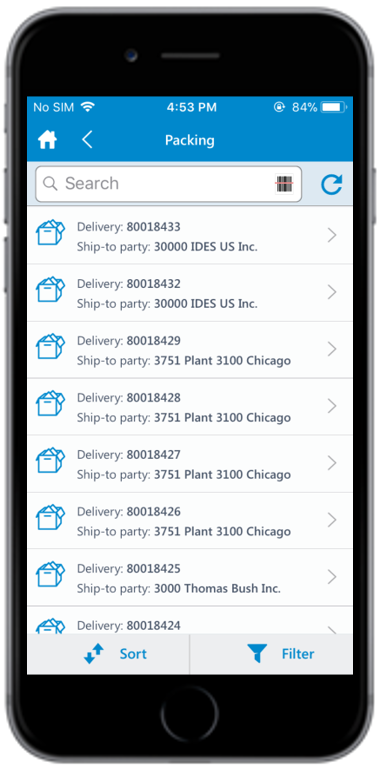
-
Select the line items to pack/unpack.
Figure 2. Picking Delivery Document Details 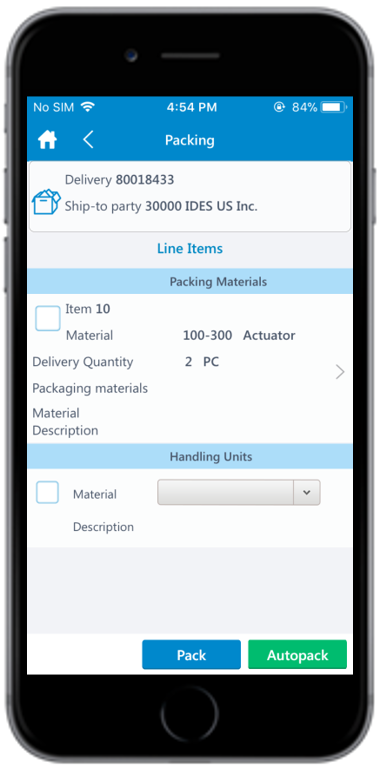
The packing list is posted for the delivery document.