
Review Operator and Group Performance
Use the Operator Productivity Dashboard to compare round completion, timeliness, scan compliance, Issues, and Actions by Operator or User Group.
Filter performance by Plant, Unit, Shift, and a time range such as Today, Last 7 Days, Last 30 Days, 3 Months, 6 Months, or Custom.
The dashboard provides four summary widgets:
- Round Compliance: rounds completed compared with rounds assigned.
- Non-Compliance: overdue and skipped rounds.
- Issues: Issues reported during rounds.
- Actions: follow-up Actions recorded.
-
Click By Operator to review individual performance, or click By Group to review User Group performance.
Figure 1. Operator Productivity Dashboard 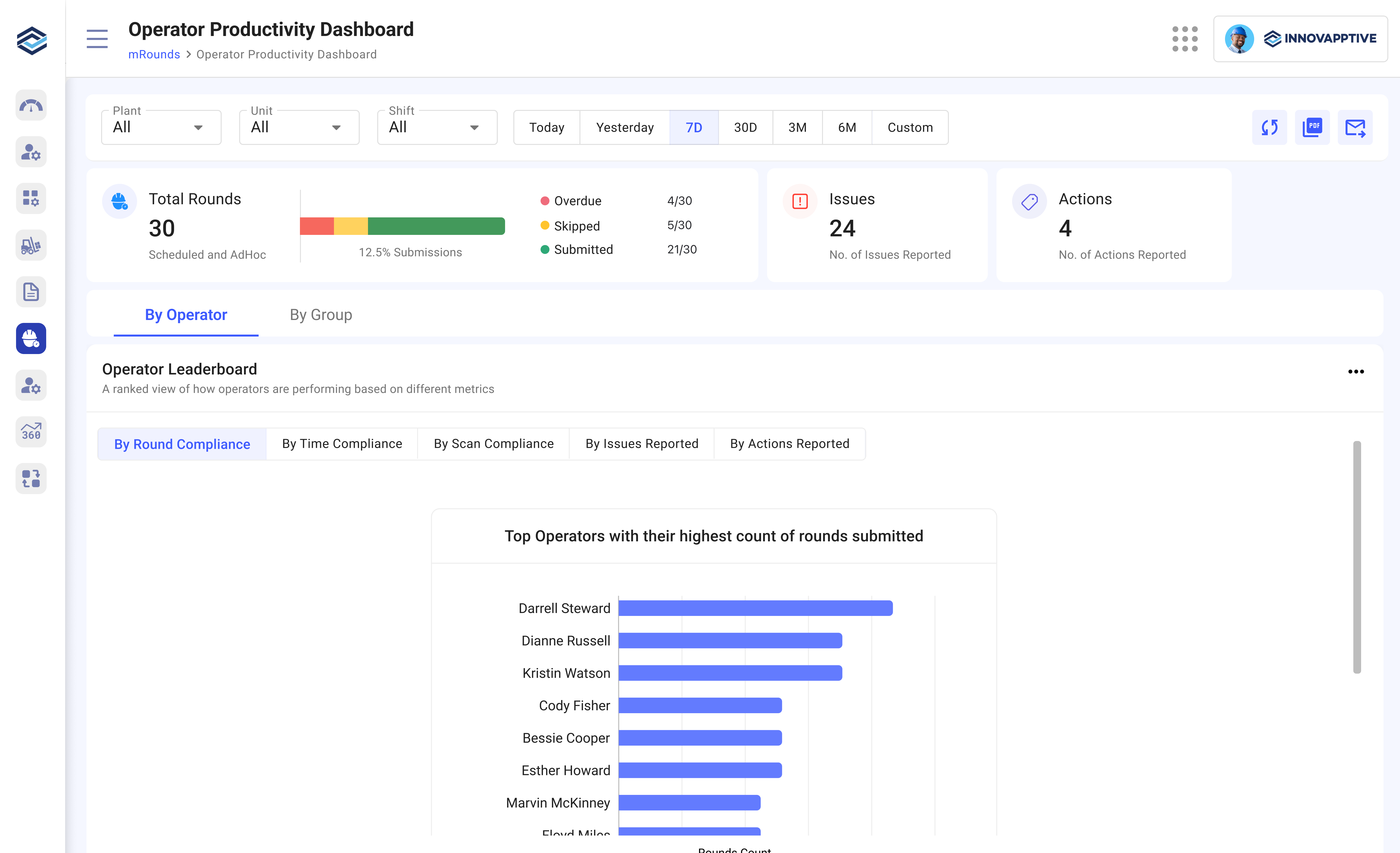
By Operator: Review individual Operator results when you need to understand workload, completion, timeliness, scan behavior, and reported findings for a specific person.
The Performance Views for Operators are:
- By Round Compliance – Operators ranked by the number of rounds submitted.
- By Time Compliance – Evaluates how timely Operators were in completing rounds.
- By Scan Compliance – Identifies Operators with the most scan overrides.
- Most Issues Reported – Highlights Operators who reported the most Issues.
- Most Actions Reported – Shows Operators with the highest number of follow-up Actions.
Each row in the Operator Performance Table includes:
- Operator Name
- Assigned – Total rounds assigned in the selected time period
- Submitted – Rounds completed and submitted
- Skipped – Rounds not performed
- Overdue – Rounds submitted after the due time
- Compliance – Percentage of rounds submitted vs. assigned
- Issues – Number of Issues raised by the Operator
- Actions – Number of Actions created from reported Issues
By Group: Review performance by User Group when you need to compare crews or shifts rather than individual Operators.
The group performance views are:
- By Round Compliance – Groups ranked by completion rate
- By Time Compliance – Based on timeliness of submissions
- By Scan Compliance – Highlights tag scanning compliance
- Most Issues Reported – Groups that identified the most Issues
- Most Actions Reported – Groups that created the most follow-up Actions
Each group record in the User Group performance table includes:
-
Group Name
-
Users – Number of users in the group
-
Assigned – Total rounds assigned to the group
-
Submitted – Rounds submitted
-
Skipped – Rounds skipped
-
Overdue – Rounds not completed on time
-
Compliance – Submission rate as a percentage
-
Issues – Total Issues reported by the group
- Actions – Actions recorded from those Issues
The dashboard displays performance results by Operator or User Group for the selected filters.
Next: When the results reveal work that needs attention, open the Operations Control Center Dashboard or go to Investigate Rounds That Need Attention.