
Issue the Permit
After authorization or field validation, the permit moves to the Stage 4 (Issue stage), where the issuer formally releases the permit for execution.
Follow the steps below to Issue the permit:
Issue Permit
Follow the steps below to issue the permit:
- Go to the Permits tab.
- Select the permit to issue.
- Review the permit details.
-
Click Take Action.
Figure 1. Issue the Permit 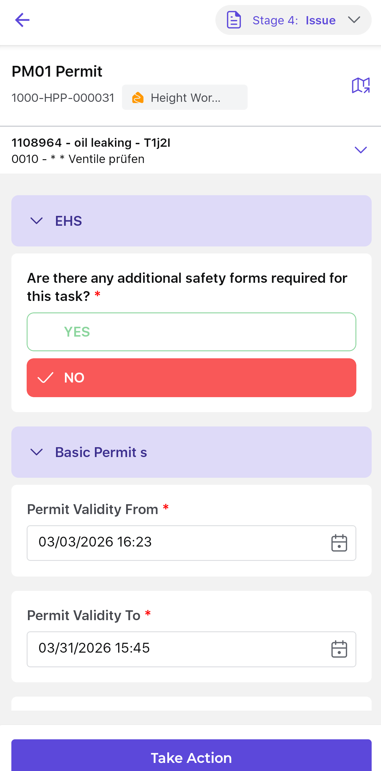
-
Select one of the following actions:
- Mark as Issued: Issues the permit and moves it to the execution stage.
- Hold: Temporarily pauses the permit if site conditions are not suitable (for example, unsafe environmental conditions or an unprepared work area).
- Resume: Continues the permit once site conditions return to normal and the work can proceed safely.
- Reject: Rejects the permit if it is no longer required.
Figure 2. Hold/Issue/Reject the Permit 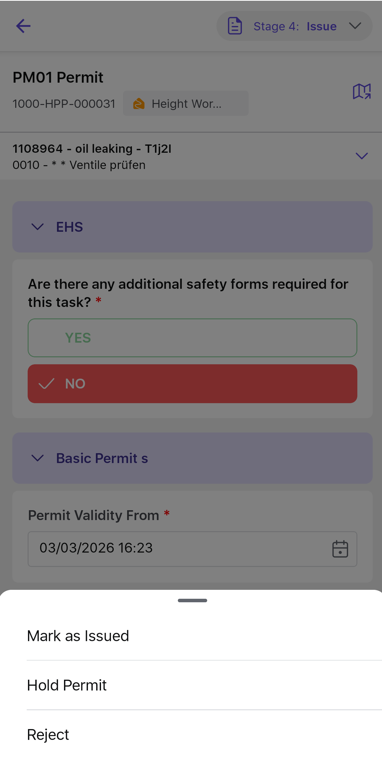
- Add your signature in the Signature block.
- Click Submit to move the permit to the Execute stage.