
Review Scheduled Round Plan Details
Open a scheduled plan or round when you need its schedule, assignment, progress, task, and PDF details before taking action.
For example, open the Control Valve Maintenance Round Plan to check which tasks are complete and which are pending. The same view shows whether operators met any issues during execution, so you keep a clear overview of the health of your equipment and processes.
-
Click
 and select Show Rounds for
the scheduled round to view.
The list shows all scheduled rounds.
and select Show Rounds for
the scheduled round to view.
The list shows all scheduled rounds. -
Click and select Show Details
for the scheduled round to view.
The round details open on the right side. Click View PDF to view the details as a PDF, or click Download to download them in PDF format. Inside the PDF, click a link to view or download an attachment such as a video, audio file, or document. For more information, see What the Round Plan PDF Contains.
Note:For an Overdue round, select the reason in the Reason column.Figure 1. View Round Details 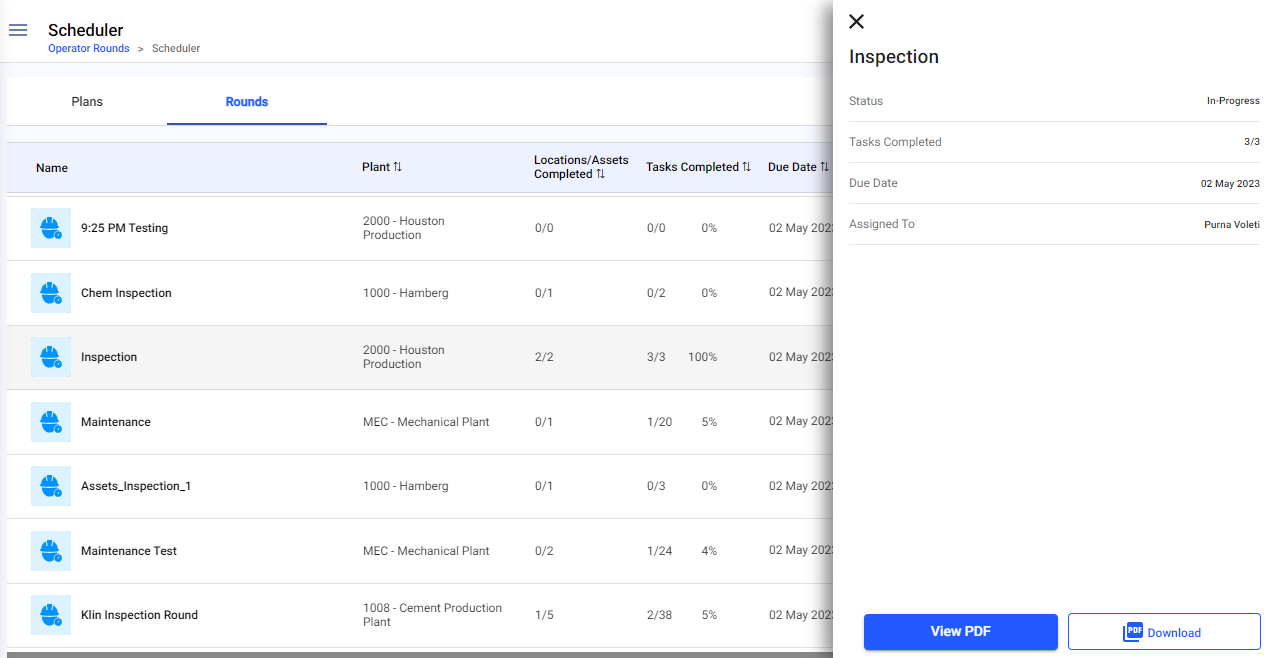
The plan or round details are open beside the list, ready to review or download as a PDF.
Next: Return to Investigate Rounds That Need Attention and record the required follow-up.