
Pause and Resume a Round Plan
Pause a round plan when its unit or equipment is offline for a planned shutdown, turnaround, or maintenance window, and resume it when the unit is back in service.
While a plan is paused, no new rounds are generated for it. The plan keeps its schedule, assigned operators, and settings, so you can resume it without scheduling it again.
For example, unit CDU-1 shuts down for a turnaround from 1 to 15 November. Pause its round plans with a time-bound pause from 1 to 15 November. No rounds are generated for these dates, and the plans resume automatically on 16 November.
Note:
Pause Plan and Resume Schedule appear only if your role allows you
to perform these actions.
To pause a round plan:
-
Click the Actions icon for the plan and select Pause Plan.
The Pause Schedule window opens.
Figure 1. Pause Round Plan 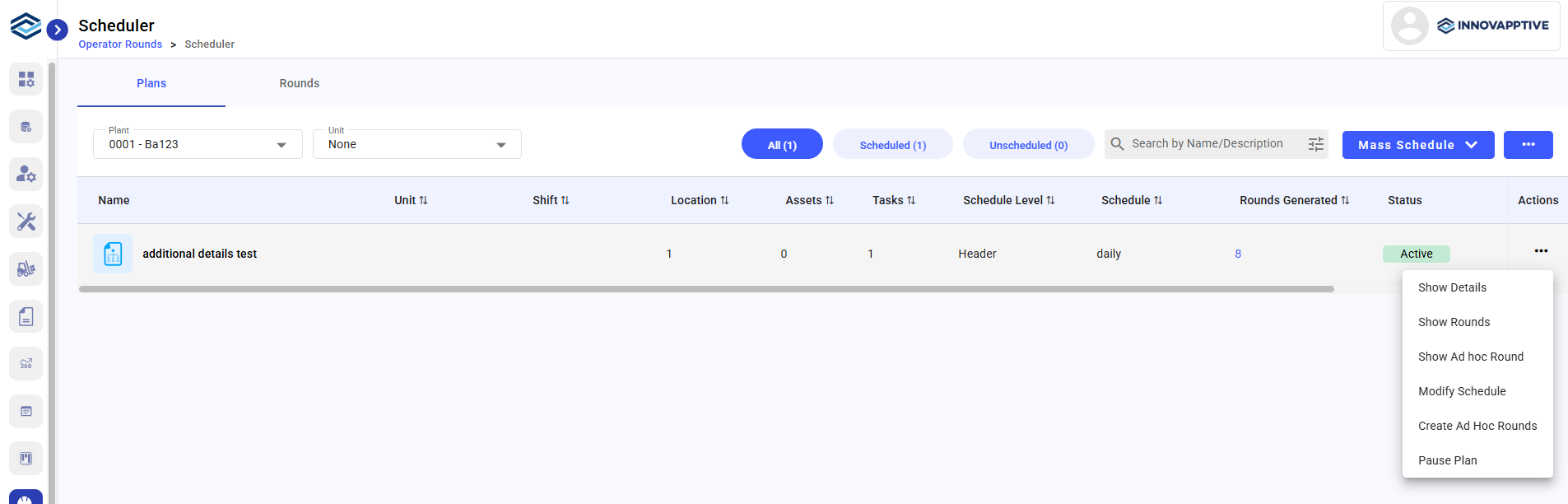
-
Click Pause.
Figure 2. Schedule Pause Plan 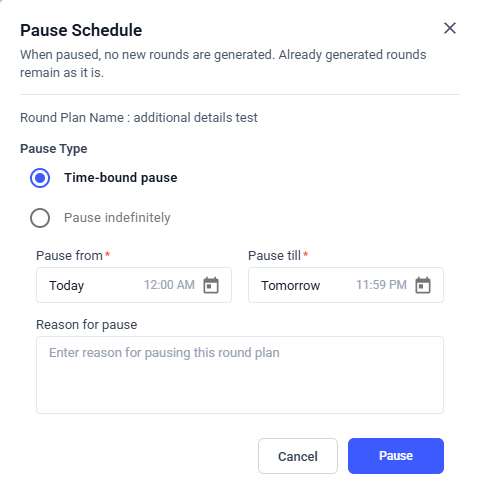
The Round Plan is Paused or resumed.
Next:Monitor future generated rounds under the updated schedule.